
Crossing Twisted Rings
Loading the math board and drawing, please wait…
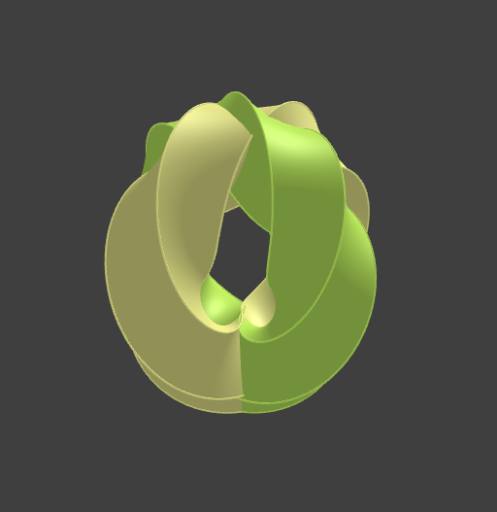
This example demonstrates the complex geometric intersection of two twisted rings, showcasing spatial geometry, parametric equations, and surface/space curve visualization. Key mathematical concepts include solid geometry and parametric representation. Construction involves using GeoGebra commands like CurveCartesian and Surface, along with objects such as Curv51/61/62 and Surf51/61/62, emphasizing interactive geometry and calculus applications. Suitable for high school and advanced learners studying 3D geometry, parametric equations, and calculus, or for educational demonstrations.
GeoGebra Commands & Parameters
CurveCartesian(((cos((5 * b)) - sin((5 * b)) + 3) * sin((4 * b))), sin((5 * b)) + cos((5 * b)), ((cos((5 * b)) - sin((5 * b)) + 3) * cos((4 * b))), b, (-π), π) → Curv51Surface(((cos((5 * b)) - (t * sin((5 * b))) + 3) * sin((4 * b))), sin((5 * b)) + (t * cos((5 * b))), ((cos((5 * b)) - (t * sin((5 * b))) + 3) * cos((4 * b))), t, -1, 1, b, (-π), π) → Surf51CurveCartesian((-sin((3 * b))) - cos((3 * b)), ((cos((3 * b)) - sin((3 * b)) + 3) * cos((2 * b))), ((cos((3 * b)) - sin((3 * b)) + 3) * sin((2 * b))), b, (-π), π) → Curv61CurveCartesian((-cos((3 * b))) + sin((3 * b)), (((-sin((3 * b))) - cos((3 * b)) + 3) * cos((2 * b))), (((-sin((3 * b))) - cos((3 * b)) + 3) * sin((2 * b))), b, (-π), π) → Curv62Surface((-sin((3 * b))) - (t * cos((3 * b))), ((cos((3 * b)) - (t * sin((3 * b))) + 3) * cos((2 * b))), ((cos((3 * b)) - (t * sin((3 * b))) + 3) * sin((2 * b))), t, -1, 1, b, (-π), π) → Surf61Surface((-cos((3 * b))) + (t * sin((3 * b))), (((-sin((3 * b))) - (t * cos((3 * b))) + 3) * cos((2 * b))), (((-sin((3 * b))) - (t * cos((3 * b))) + 3) * sin((2 * b))), t, -1, 1, b, (-π), π) → Surf62
AI Drawing Prompt Reference
Visualize the complex geometric intersection of two twisted rings, showcasing spatial geometry, parametric equations, and surface/space curve visualization. First draw the first ring, then create two surfaces generated by the first and second rings respectively, and finally display the two rings along with the surfaces they generate, emphasizing the application of solid geometry and parametric equations.
The prompt above was compiled from the original drawing commands and is for reference only.