
Cross Sections of Quadratic Surfaces Demo
Loading the math board and drawing, please wait…
In collections
Conics
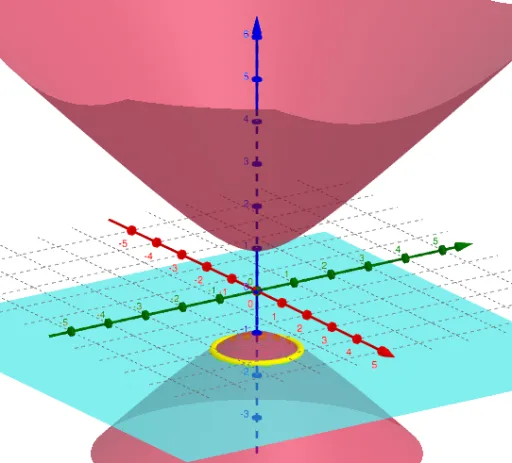
This example demonstrates the intersection of various quadratic surfaces with slicing planes, visually revealing cross-sectional shapes like ellipses and hyperbolas. It involves core math concepts such as quadratic surface equations, cross-section transformations, and coordinate geometry intersection calculations. GeoGebra commands used include SelectedElement, LaTeX, and IntersectPath. Suitable for high school students and math enthusiasts studying spatial geometry and analytical geometry.
GeoGebra Commands & Parameters
SelectedElement(S) → text1SelectedElement(P) → text2LaTeX(a, true, false) → text3LaTeX(b, true, false) → text4LaTeX(d, true, false) → text5IntersectPath(b, p) → fIntersectPath(d, p) → gIntersectPath(a, p) → hIntersectPath(a, e) → qIntersectPath(d, e) → rIntersectPath(b, e) → sIntersectPath(b, hp) → tIntersectPath(d, hp) → c_1IntersectPath(a, hp) → d_1IntersectPath(a, c) → e_1IntersectPath(d, c) → f_1IntersectPath(b, c) → g_1IntersectPath(b, h1) → h_1IntersectPath(d, h1) → k_1IntersectPath(a, h1) → p_1IntersectPath(d, h2) → q_1IntersectPath(b, h2) → r_1IntersectPath(a, h2) → s_1LaTeX(c, true, false) → text6LaTeX(p, true, false) → text7LaTeX(e, true, false) → text8LaTeX(hp, true, false) → text9LaTeX(h1, true, false) → text10LaTeX(h2, true, false) → text11
AI Drawing Prompt Reference
Visualize the intersections of various quadratic surfaces with slicing planes to reveal cross-sectional shapes like ellipses and hyperbolas, highlighting core math concepts such as quadratic surface equations, cross-section transformations, and coordinate geometry intersection calculations, by sequentially drawing the intersection lines of different planes and labeling key parameters and geometric relationships.
The prompt above was compiled from the original drawing commands and is for reference only.