
Creating Histograms from Popcorn Data
Loading the math board and drawing, please wait…
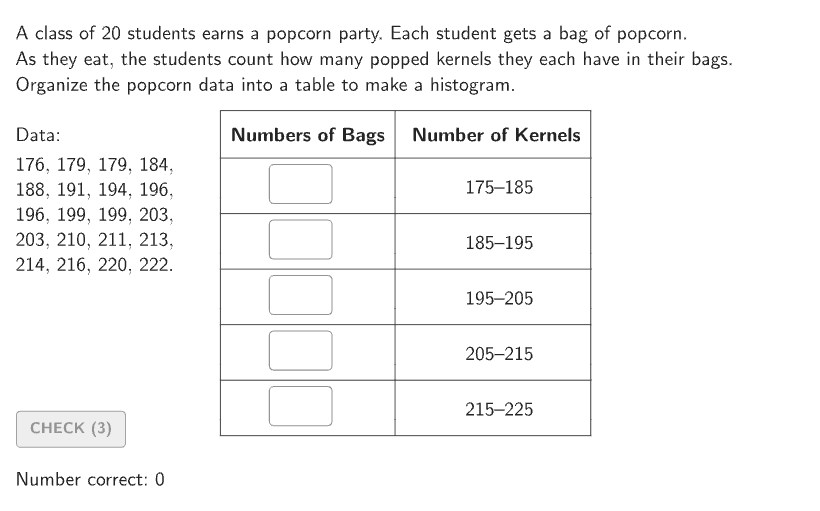
This activity demonstrates how to create histograms from popcorn data. Key math concepts include data organization, frequency analysis, and histogram plotting. Construction involves using GeoGebra commands like Shuffle, Sort, CountIf, and Bar to organize data and draw histograms. Suitable for students in grades 6-8 for statistics practice.
GeoGebra Commands & Parameters
Shuffle(Join[{Sequence[176, 224], Sequence[176, 224], Sequence[176, 224], Sequence[176, 224], Sequence[176, 224]}]) → randomList1, {196, 191, 222, 188, 179, 196, 176, 213, 216, 179, 210, 199, 203, 211, 214, 203, 194, 184, 199, 220, 185, 221, 177, 218, 221, 179, 197, 217, 189, 180, 223, 201, 177, 195, 220, 200, 213, 212, 178, 193, 218, 200, 191, 217, 216, 184, 207, 176, 220, 178, 181, 214, 196, 192, 210, 183, 215, 207, 210, 217, 176, 189, 219, 203, 213, 182, 206, 216, 222, 193, 206, 191, 194, 202, 197, 181, 176, 209, 214, 181, 223, 217, 187, 214, 196, 204, 191, 208, 201, 195, 220, 203, 194, 185, 197, 202, 222, 184, 212, 187, 186, 201, 207, 211, 189, 222, 223, 211, 188, 223, 206, 179, 208, 198, 197, 218, 200, 184, 221, 185, 209, 180, 198, 208, 195, 190, 221, 190, 213, 209, 205, 200, 219, 224, 204, 186, 220, 215, 205, 218, 202, 204, 204, 177, 180, 182, 195, 213, 223, 207, 192, 187, 218, 193, 208, 185, 202, 201, 205, 192, 210, 206, 188, 186, 219, 189, 199, 201, 183, 186, 212, 211, 177, 193, 215, 180, 187, 224, 188, 186, 204, 182, 187, 224, 198, 205, 217, 183, 219, 190, 178, 183, 196, 219, 200, 215, 185, 209, 192, 183, 191, 214, 178, 207, 178, 202, 193, 212, 177, 208, 224, 216, 221, 182, 179, 195, 216, 198, 199, 190, 192, 203, 222, 184, 194, 224, 181, 181, 176, 189, 206, 188, 182, 215, 210, 199, 212, 197, 180, 190, 205, 198, 211, 194, 209}Sort(Take[randomList1, 1 + (20 * Mod[countQuestion, 12]), 20 + (20 * Mod[countQuestion, 12])]) → dataCountIf(x > 215, data) → ansBar5CountIf(x > 205 ∧ x ≤ 215, data) → ansBar4CountIf(x > 195 ∧ x ≤ 205, data) → ansBar3CountIf(x > 185 ∧ x ≤ 195, data) → ansBar2CountIf(x ≤ 185, data) → ansBar1If(showsolution, Max[{ansBar1, ansBar2, ansBar3, ansBar4, ansBar5}], Max[{input1, input2, input3, input4, input5}]) → highestBarBar((4, 0), (5, ((tt * ansBar5) * heightUnit))) → barSln5Bar((3, 0), (4, ((tt * ansBar4) * heightUnit))) → barSln4Bar((2, 0), (3, ((tt * ansBar3) * heightUnit))) → barSln3Bar((1, 0), (2, ((tt * ansBar2) * heightUnit))) → barSln2Bar((0, 0), (1, ((tt * ansBar1) * heightUnit))) → barSln1CountIf(x ≥ 215, data) → ansBar5xCountIf(x ≥ 205 ∧ x < 215, data) → ansBar4xCountIf(x ≥ 195 ∧ x < 205, data) → ansBar3xCountIf(x ≥ 185 ∧ x < 195, data) → ansBar2xCountIf(x < 185, data) → ansBar1xShuffle(Sequence[15]) → randomList2, {6, 3, 12, 9, 1, 10, 11, 7, 4, 15, 14, 8, 13, 2, 5}Element(randomList2, Mod[countQuestion, 15] + 1) → randomNum2Element(randomList1, Mod[countQuestion, 20] + 1) → randomNum1Textfield(input1) → InputBox1Textfield(input2) → InputBox2Polygon(Zip[PixelsToPoint[Corner[1], Corner[3], Corner[5], A], A, {(pixelsLeft, pixelsTop), (pixelsLeft, y(Corner[5]) - pixelsBottom), Corner[5] - (pixelsRight, pixelsBottom), (x(Corner[5]) - pixelsRight, pixelsTop)}]) → borderBoxTextfield(input3) → InputBox3Textfield(input4) → InputBox4Textfield(input5) → InputBox5Bar((0, 0), (1, (input1 * heightUnit))) → barSt1Bar((1, 0), (2, (input2 * heightUnit))) → barSt2Bar((2, 0), (3, (input3 * heightUnit))) → barSt3Bar((3, 0), (4, (input4 * heightUnit))) → barSt4Bar((4, 0), (5, (input5 * heightUnit))) → barSt5PolyLine({(5.3, 0), (0, 0), (0, ((1.05 * highestBar) * heightUnit))}) → AxesBar((0, 0), (1, (input1 * heightUnit))) → barSt1BorderBar((1, 0), (2, (input2 * heightUnit))) → barSt2BorderBar((2, 0), (3, (input3 * heightUnit))) → barSt3BorderBar((3, 0), (4, (input4 * heightUnit))) → barSt4BorderBar((4, 0), (5, (input5 * heightUnit))) → barSt5BorderSequence(Segment[(0, (n * heightUnit)), (5.3, (n * heightUnit))], n, 1, highestBar) → gridStSequence(Segment[(n, 0), (n, -2)], n, 0, 5) → ticksStHSequence(Segment[(0, n), (-0.05, n)], n, heightUnit, (heightUnit * highestBar), heightUnit) → ticksStVVerticalText("Numbers of Bags") → LabelStVIf(showsolution, -11, -6) → MinXIf(showsolution, 5, 11.5) → MaxXBar((0, 0), (1, ((tt * ansBar1) * heightUnit))) → barSln1BorderBar((1, 0), (2, ((tt * ansBar2) * heightUnit))) → barSln2BorderBar((2, 0), (3, ((tt * ansBar3) * heightUnit))) → barSln3BorderBar((3, 0), (4, ((tt * ansBar4) * heightUnit))) → barSln4BorderBar((4, 0), (5, ((tt * ansBar5) * heightUnit))) → barSln5BorderCorner(5) → AppSizeZip(Text[A, B, true, true, 0], A, Sequence[175, 225, 10], B, Sequence[(n, -15), n, 0, 5]) → ticksLblStXZip(Text[If[Mod[A, ticksLblStYStep] ≟ 0, ("" * A), ""], B, true, true, -1, 0], A, Sequence[1, highestBar], B, Sequence[(0, (n * heightUnit) + 1), n, 1, highestBar]) → ticksLblStY
AI Drawing Prompt Reference
Draw a histogram with five bars representing data intervals: x > 215, 205-215, 195-205, 185-195, and x ≤ 185. The bar heights are determined by statistical counts. Also draw five input boxes and a histogram using the input box values, along with axes, ticks, grid, and vertical text "Numbers of Bags".
The prompt above was compiled from the original drawing commands and is for reference only.