
Create a triangle with specified area: Geometric construction and area calculati
Loading the math board and drawing, please wait…
In collections
Area of a Triangle: Intuitive Discovery
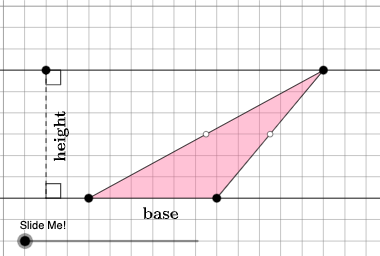
This example demonstrates how to create a triangle with a given area using GeoGebra and perform area calculations. The key mathematical concepts include area, geometric construction, and trigonometry. Construction involves using commands like Point, Polygon, OrthogonalLine, Midpoint, and Dilate to accurately shape the triangle. It is suitable for middle or high school mathematics courses for teaching geometric construction and area computation.
GeoGebra Commands & Parameters
Point(Ray[A, A + (1, 0)]) → BPointIn(d) → CPolygon(A, B, C) → t1, f, a, bOrthogonalLine(C, g) → hIntersect(g, h) → C_{1}Midpoint(C, C_{1}) → DMidpoint(b) → EMidpoint(a) → GDilate(C, If[0 < c ≤ 1, 1 - c, 0], D) → F'Segment(C, F') → iDilate(D, If[1 < c ≤ 2, 2 - c, 0], C_{1}) → D'Segment(D, D') → jRotate(C, If[2 < c ≤ 3, ((c - 2) * pi), pi], D) → F'_{1}Rotate(F', If[2 < c ≤ 3, ((c - 2) * pi), pi], D) → F''Segment(F'_{1}, F'') → i'Dilate(E, If[0 < c ≤ 2, (0.5 * (2 - c)), 0], D) → E'Segment(E, E') → kDilate(G, If[0 < c ≤ 2, (0.5 * (2 - c)), 0], D) → G'Segment(G, G') → lAngle(C, B, A) → βAngle(B, A, C) → γPolygon(A, B, G, E) → q1, a_1, b_1, g_1, ePolygon(G, C, E) → t2, e_1, g_2, f_1Rotate(G, If[4 < c ≤ 5, ((c - 4) * pi), pi], E) → G'_{1}Rotate(C, If[4 < c ≤ 5, ((c - 4) * pi), pi], E) → F'_{2}Rotate(E, If[4 < c ≤ 5, ((c - 4) * pi), pi], E) → E'_{1}Polygon(G'_{1}, F'_{2}, E'_{1}) → t2', e'_{1}, g'_{1}, f'_{2}Segment(A, E) → mSegment(B, G) → nSegment(G, C) → pSegment(C, E) → qSegment(F'_{2}, E) → rSegment(E, G'_{1}) → sSegment(G'_{1}, F'_{2}) → tSegment(G, C) → h_1Segment(C, E) → i_1If(β ≟ pi / 2, 5, 8) → oOrthogonalLine(B, p_1) → j_1Intersect(p_1, j_1) → HOrthogonalLine(G, g) → k_1Intersect(k_1, g) → IDilate(G, If[5 < c ≤ 6, 6 - c, 0], I) → G'_{2}Segment(G, G'_{2}) → l_1Polygon(A, I, G, G'_{1}) → q2, a_2, i_2, g_3, m_1Polygon(I, B, G) → t3, g_4, i_3, b_2Dilate(G, If[7 < c ≤ 8, 8 - c, 0], G'_{1}) → G'_{3}Vector(G, G'_{3}) → uTranslate(I, u) → I'Translate(B, u) → B'Translate(G, u) → G'_{4}Polygon(I', B', G'_{4}) → t3', g'_{4}, n_1, b'Segment(G'_{3}, I') → q_1Segment(G'_{3}, B') → r_1Dilate(B, If[5 < c ≤ 6, 6 - c, 0], H) → H'Polygon(A, B, H, G'_{1}) → q3, a_3, b_3, h_2, t_1Polygon(B, H, G) → t4, g_5, b_4, h_3Translate(B, u) → B'_{1}Translate(H, u) → H'_{1}Translate(G, u) → G'_{5}Polygon(B'_{1}, H'_{1}, G'_{5}) → t4', g'_{5}, b'_{1}, h'_{1}Segment(B'_{1}, G'_{3}) → c_1Segment(B'_{1}, H'_{1}) → d_1Segment(B, H') → s_1Point(Line[A, B]) → FPoint(f_2) → JIntersect(eq1, Line[A, B]) → KSegment(J, K) → j_2Point(Line[A, B]) → LAngle(L, K, J) → αAngle(K, J, C) → δRotateText(text2, pi / 2) → text3
AI Drawing Prompt Reference
Draw a triangle by first determining a point, then drawing a ray from it and marking a second point on the ray. Use a given area method to find the third point and connect the three points to form the triangle. From the third point, draw a perpendicular line to a certain line, find the intersection point, and perform a series of scaling and rotation operations based on this point to create multiple auxiliary shapes and connecting lines, demonstrating the geometric construction and area calculation of the triangle.
The prompt above was compiled from the original drawing commands and is for reference only.