
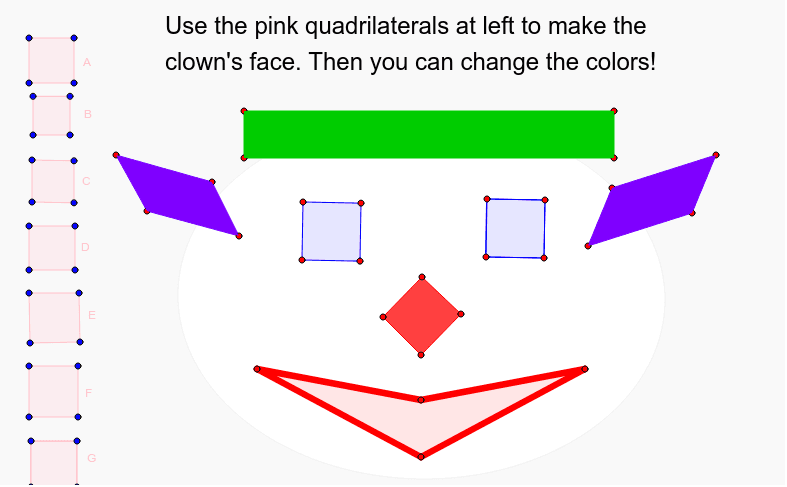
Create a Clown Face with Pink Quadrilaterals
Loading the math board and drawing, please wait…
In collections
Elementary Geometry
This example demonstrates how to draw a clown's face using pink quadrilaterals, involving core math concepts like polygons, geometric transformations, and symmetry. It utilizes commands and objects such as Line, OrthogonalLine, Point, Intersect, Polygon, Circle, LineBisector, Mirror, and Ellipse in GeoGebra. Suitable for middle school and above students to learn geometric constructions and transformations.
GeoGebra Commands & Parameters
Line(D, E) → aOrthogonalLine(D, a) → bOrthogonalLine(E, a) → dPoint(d) → FOrthogonalLine(F, d) → eIntersect(b, e) → GPolygon(E, F, G, D) → poly1, e_1, f, g, d_1Polygon(H, I, 4) → poly2, h, i, j, k, J, KCircle(T, U) → c_1Circle(V, U) → f_1Intersect(c_1, f_1, 2) → WPolygon(T, U, V, W) → poly5, t_1, u, v, wCircle(Z, A_1) → g_1Circle(A_1, Z) → h_1Point(h_1) → B_1Circle(B_1, A_1) → k_1Intersect(g_1, k_1, 2) → C_1Polygon(Z, C_1, B_1, A_1) → poly6, z, c_2, b_1, a_1LineBisector(S, R) → rMirror(D_1, r) → E_1Polygon(R, S, E_1, D_1) → poly4, r_1, s, e_2, d_2Line(F_1, G_1) → qLine(H_1, q) → tLine(F_1, H_1) → i_1Line(G_1, i_1) → j_1Intersect(t, j_1) → I_1Polygon(F_1, G_1, I_1, H_1) → poly7, f_2, g_2, i_2, h_2Polygon(J_1, P, Q, K_1) → poly8, j_2, p_1, q_1, k_2Line(D_2, E_2) → a_2OrthogonalLine(D_2, a_2) → b_2OrthogonalLine(E_2, a_2) → d_4Point(d_4) → F_2OrthogonalLine(F_2, d_4) → e_4Intersect(b_2, e_4) → G_2Polygon(E_2, F_2, G_2, D_2) → poly1_1, e_3, f_3, g_3, d_3Circle(Z_1, A_2) → g_4Circle(A_2, Z_1) → h_3Point(h_3) → B_2Circle(B_2, A_2) → k_3Intersect(g_4, k_3, 2) → C_2Polygon(Z_1, C_2, B_2, A_2) → poly6_1, z_1, c_3, b_3, a_3Polygon(H_2, I_2, 4) → poly2_1, h_4, i_3, j_3, k_4, J_2, K_2LineBisector(S_1, R_1) → r_3Mirror(D_3, r_3) → E_3Polygon(R_1, S_1, E_3, D_3) → poly4_1, r_2, s_1, e_5, d_5Line(F_3, G_3) → q_2Line(H_3, q_2) → t_2Line(F_3, H_3) → i_5Line(G_3, i_5) → j_4Intersect(t_2, j_4) → I_3Polygon(F_3, G_3, I_3, H_3) → poly7_1, f_4, g_5, i_4, h_5Circle(T_1, U_1) → c_4Circle(V_1, U_1) → f_5Intersect(c_4, f_5, 2) → W_1Polygon(T_1, U_1, V_1, W_1) → poly5_1, t_3, u_1, v_1, w_1Polygon(J_3, P_1, Q_1, K_3) → poly8_1, j_5, p_2, q_3, k_5Ellipse(A, B, C) → c
AI Drawing Prompt Reference
Draw a clown face using pink quadrilaterals, incorporating symmetry and geometric transformations. Start by creating basic quadrilaterals and lines, then add circles and ellipses for decoration, and finally use mirroring and reflection to achieve symmetry in the design.
The prompt above was compiled from the original drawing commands and is for reference only.