
Crazy Slide!
Loading the math board and drawing, please wait…
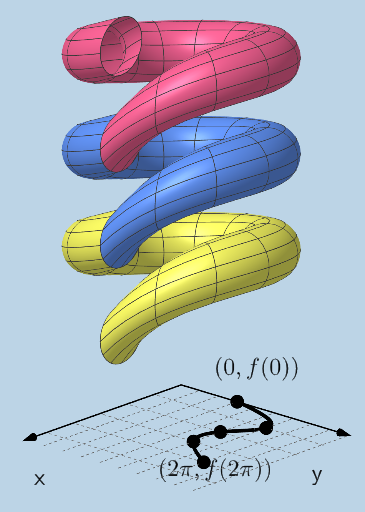
This example demonstrates the dynamic changes of a slide. It involves core mathematical concepts such as functions, vectors, and transformations. Using commands like FitPoly, CurveCartesian, Surface, Vector, and Translate, the dynamic trajectory of the slide can be constructed. Suitable for high school and above students to learn function graphs and dynamic geometry.
GeoGebra Commands & Parameters
FitPoly(l1, n) → gCurveCartesian((R * cos(t)), (R * sin(t)), g(t), t, 0, (2 * π)) → eCurveCartesian((r * cos(t)), (r * sin(t)), g(t), t, 0, (2 * π)) → iSurface(((R + (r * cos(v))) * cos(u)), ((R + (r * cos(v))) * sin(u)), (r * sin(v)) + g(u), u, 0, (2 * π), v, 0, (2 * π)) → jVector((0, 0, g((2 * π)) - g(0))) → uTranslate(j, u) → j'Translate(j, Vector[(2 * u)]) → j'_{1}
AI Drawing Prompt Reference
Draw the dynamic trajectory of a slide using function fitting and curve drawing to represent the shape of the slide. First, fit a polynomial function, then draw the curve of the function, and create the slide's surface. Use translation and rotation to show the dynamic changes of the slide.
The prompt above was compiled from the original drawing commands and is for reference only.