
Cosine Law by Earl Samuelson
Loading the math board and drawing, please wait…
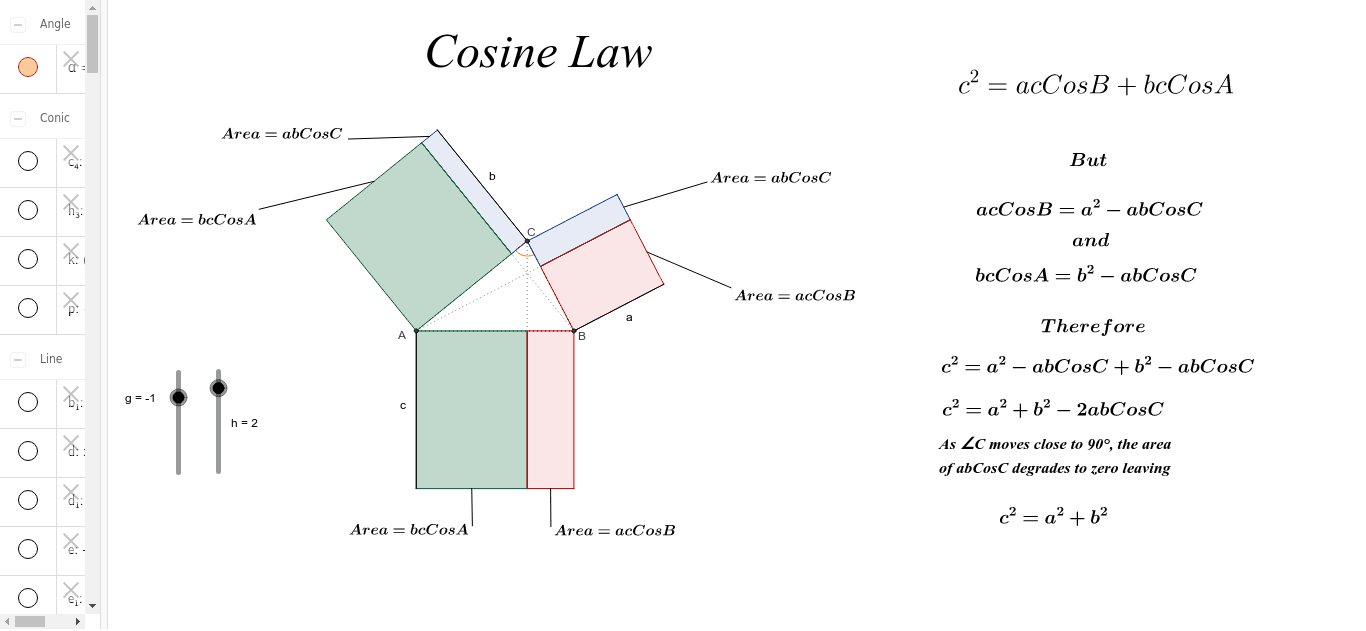
This example illustrates the Cosine Law, which states that the square of any side of a triangle is equal to the sum of the squares of the other two sides minus twice their product with the cosine of the included angle. Key concepts include trigonometry and geometric construction. It uses commands like Circle, Intersect, Polygon, Angle, OrthogonalLine, Segment, Line, PointIn, Midpoint in GeoGebra.
GeoGebra Commands & Parameters
Circle(A_1, 5) → c_4Intersect(c_4, b_1, 1) → AIntersect(c_4, b_1, 2) → BIntersect(c_4, d, 1) → CPolygon(A, C, B) → poly1, b_2, a_1, c_1Angle(A, C, B) → αOrthogonalLine(B, b_2) → eOrthogonalLine(C, c_1) → fOrthogonalLine(A, a_1) → g_3Intersect(e, b_2) → DIntersect(g_3, a_1) → EIntersect(f, c_1) → FCircle(F, c_1) → h_3Intersect(h_3, f, 2) → GSegment(F, G) → iCircle(D, b_2) → kIntersect(k, e, 2) → HSegment(D, H) → jCircle(E, a_1) → pIntersect(p, g_3, 2) → ISegment(E, I) → lLine(H, b_2) → mLine(G, c_1) → nLine(I, a_1) → qLine(C, j) → rLine(A, j) → sLine(A, i) → tLine(B, i) → d_1Line(B, l) → e_1Line(C, l) → f_1Intersect(m, r) → JIntersect(m, s) → KIntersect(q, f_1) → LIntersect(q, e_1) → MIntersect(n, t) → NIntersect(n, d_1) → OPolygon(D, H, J, C) → poly2, d_2, h_1, j_1, c_2Polygon(C, L, I, E) → poly3, c_3, l_1, i_1, e_2PointIn(poly2) → Pointpoly2PointIn(poly3) → Pointpoly3_1Polygon(A, K, H, D) → poly4, a_2, k_1, h_2, d_3Polygon(A, F, G, N) → poly5, a_3, f_2, g_1, n_1PointIn(poly5) → Pointpoly5PointIn(poly4) → Pointpoly4Polygon(F, B, O, G) → poly6, f_3, b_3, o, g_2Polygon(B, M, I, E) → poly7, a_5, m_1, i_2, e_3PointIn(poly7) → Pointpoly7PointIn(poly6) → Pointpoly6PointIn(poly3) → Pointpoly3Segment(B, D) → p_1Segment(A, E) → q_1Segment(F, C) → r_1Midpoint(h_1) → PMidpoint(k_1) → QMidpoint(g_1) → RMidpoint(o) → SMidpoint(l_1) → TMidpoint(m_1) → USegment(P, V) → s_1Segment(Q, W) → t_1Segment(R, Z) → j_2Segment(S, B_1) → k_2Segment(U, C_1) → l_2Segment(T, D_1) → m_2Segment(C, J) → bSegment(B, M) → aSegment(A, N) → c
AI Drawing Prompt Reference
Draw a triangle ABC with A, B, and C as the intersection points of circles with radius 5 and lines b1, d. Construct the sine lines for angles A, B, and C, then use perpendicular lines to create auxiliary segments, forming shapes such as quadrilateral DHJC, triangle FBI, and triangle EIC, each containing specific points and segments.
The prompt above was compiled from the original drawing commands and is for reference only.