
Cosine Function & Unit Circle Relationship
Loading the math board and drawing, please wait…
In collections
Trigonometry: Basic and More
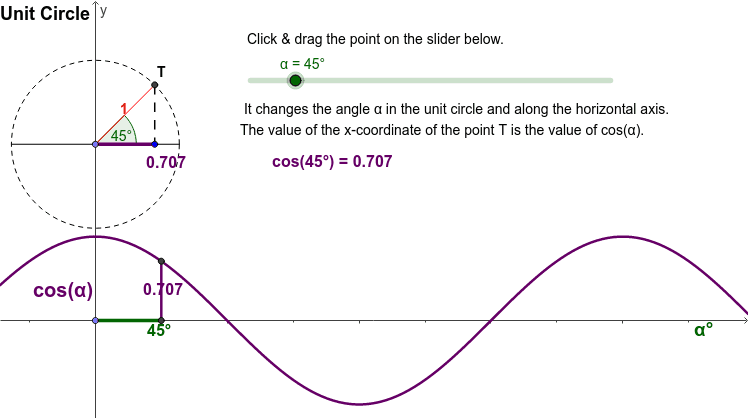
This example demonstrates the relationship between angle α in degrees and the value of cos(α) using the unit circle through an animation. Key math concepts include the unit circle, cosine function, and angle measurement. Construction involves GeoGebra commands like Circle, Line, Intersect, Rotate, Angle, Segment, Distance, OrthogonalLine, Midpoint, and Point. Suitable for high school students learning trigonometry and analytical geometry, as well as for mathematical demonstrations and teaching purposes.
GeoGebra Commands & Parameters
Circle(O, 1) → cLine(B, O) → aIntersect(c, a, 2) → CRotate(C, α, O) → DAngle(C, O, D) → βSegment(O, D) → bDistance(D, a) → dOrthogonalLine(D, a) → eIntersect(a, e) → A_2Segment(D, A_2) → gSegment(A_1, D_1) → hMidpoint(D, A_2) → EPoint(xAxis) → GSegment(G, A_1) → iIntersect(c, a, 2) → AIntersect(c, a, 1) → ISegment(I, A) → jIntersect(c, j, 2) → JSegment(O, A_2) → lMidpoint(O, D) → KMidpoint(A_1, D_1) → F
AI Drawing Prompt Reference
Draw a unit circle and label angle α to demonstrate its relationship with the cosine value. Use an animation to show how the cosine value changes as angle α moves around the circle. Key objects include the unit circle, angle α, and the cosine value, along with the line segment from the center to the endpoint of the angle. Start by drawing the unit circle and angle α, then locate the endpoint of the angle and draw the line segment connecting the center to this point. Next, use rotations and perpendicular lines to show the relationship between the cosine value and the angle, and label key points and midpoints.
The prompt above was compiled from the original drawing commands and is for reference only.