
Correcting Harriot's Fast Clock in the Second Dichotomic Observation (1611)
Loading the math board and drawing, please wait…
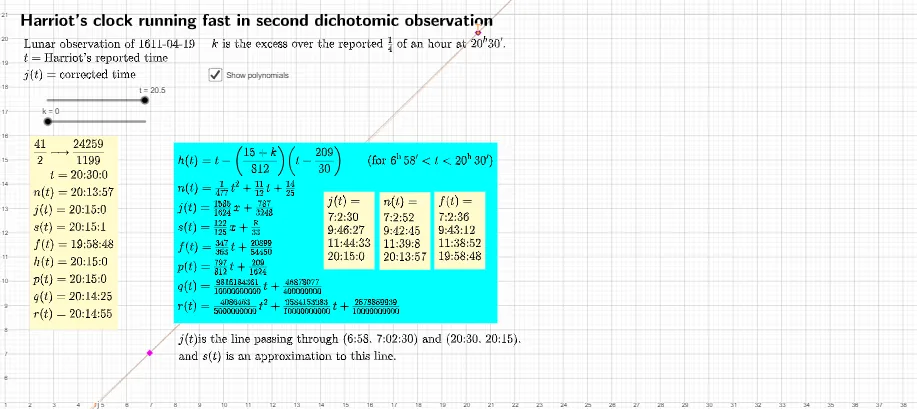
This GeoGebra example demonstrates how to correct the systematic error caused by Harriot's clock running fast during his lunar observation on 1611-04-19, using linear functions and straight-line equations. The core mathematical concepts involve linear relationships, slope and intercept fitting, and time-difference corrections in dichotomic observations. The construction uses the Line command to create multiple straight lines, FractionText to display fractional values, and various point objects (Start, End, E, E') along with text objects (text2, text3, etc.) to annotate the correction process. Suitable for high school or university courses in history of astronomy, mathematical modeling, or applications of linear functions, this example helps students understand how to use mathematical tools to correct systematic errors in experimental data.
GeoGebra Commands & Parameters
FractionText(n(t)) → text3FractionText(t) → text4Line(B, C) → l_{1}Line(E, E') → d
AI Drawing Prompt Reference
Create a coordinate-style diagram to illustrate a linear correction process: draw two straight lines defined by point pairs, where the first line represents the main linear relationship used for correction and the second line represents the related offset or difference relationship. Add two fraction text annotations on the figure: one showing the corrected time expression and another showing the original time fraction. Include concise textual labeling so the viewer can follow how the two lines relate to the displayed fraction values and the overall correction idea.
The prompt above was compiled from the original drawing commands and is for reference only.