
Sizes in On Sizes: Interactive Geometric Comparison
Loading the math board and drawing, please wait…
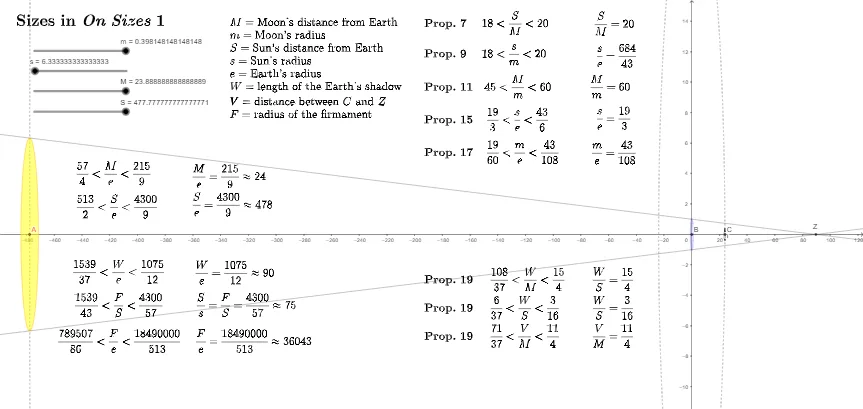
① This interactive example demonstrates the size relationships discussed in the book 'On Sizes', visually comparing different geometric objects such as circles, triangles, and segments through dynamic diagrams. ② Core mathematical concepts include circles and incircles, similar triangles, trigonometry, inequalities, fraction representations, and upper/lower Riemann sums, integrating geometry with algebra. ③ Construction highlights: Using GeoGebra commands like Line, Circle, FractionText, Intersect, and Segment, the model builds multiple points (B, s, S, β, G', G, A, D', p, D, n, m, M, c, d, e, f, g, C, h) and text objects (text1, textP17, etc.), creating adjustable size-comparison models via intersections and segments. ④ Suitable for high school to early college students for intuitive geometric understanding, inequality proofs, and optimization explorations, also useful as supplementary material for history of mathematics or classic texts.
GeoGebra Commands & Parameters
Line(D', G') → pLine(D, G) → nCircle(B, 1) → cCircle(B, M) → dCircle(B, S) → eCircle(A, s) → fCircle(A, s) → gCircle(C, m) → hFractionText(m) → textP17FractionText(s) → textP15FractionText(M) → text5FractionText(S) → text6FractionText(M / m) → textP11FractionText(S / M) → textP7FractionText(s / m) → textP9Intersect(n, p) → ZSegment(Z, C) → ZCFractionText(a) → text10Segment(Z, B) → WFractionText(W / S) → textP19WSFractionText(W / M) → textP19WMFractionText(M) → M2eFractionText(S) → S2eFractionText(W) → text18
AI Drawing Prompt Reference
Create a dynamic geometry comparison figure: draw two adjustable lines that intersect at a point Z, then construct multiple circles using given centers—use a common point B as the center for several circles with different radius parameters, and use point A as the center for two circles governed by parameter s. Also include another circle centered at C with parameter m. Connect Z to C to form segment ZC and connect Z to B to form segment ZB. Add several fraction text labels next to the diagram to display key ratios of the parameters (including comparisons involving m, M, S, and s, and ratios derived from the segment-based quantity related to the endpoint from Z to B).
The prompt above was compiled from the original drawing commands and is for reference only.