
Cookie Cutters - Extra Fun!
Loading the math board and drawing, please wait…
In collections
Developing games and puzzles with 3D printing for STEAM
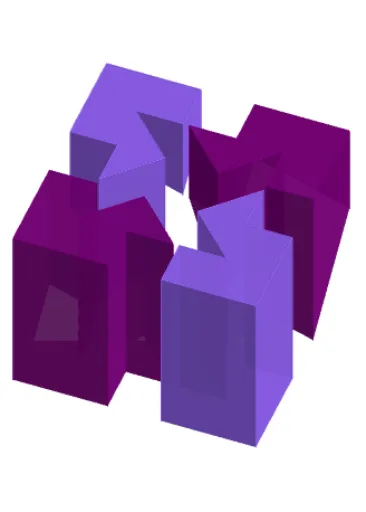
This example demonstrates the creation of cookie cutter shapes using 2D vectors, reflections, and geometric transformations. It involves core mathematical concepts like 2D vectors, reflections, standard deviation, hypergeometric distribution, and geometric transformations. The construction utilizes GeoGebra commands and objects such as Point, Polygon, Segment, Midpoint, Centroid, Circle, Intersect, Vector, Translate, and Prism. It is suitable for high school mathematics education, showcasing applications of vector operations and geometric transformations.
GeoGebra Commands & Parameters
Point(yAxis) → APoint(xAxis) → BPolygon(A, B, 4) → poly1, f, g, h, i, C, DPolygon(E, F, 4) → poly2, j, k, l, m, G, HSegment(H, F) → nSegment(E, G) → pMidpoint(i) → IMidpoint(m) → JMidpoint(l) → KMidpoint(k) → LMidpoint(j) → MMidpoint(n) → NMidpoint(h) → OMidpoint(g) → PCentroid(poly1) → QCentroid(poly1) → RMidpoint(f) → SPolygon(D, I, J, E, N, H, K, O) → poly3, d, i_1, j_1, e, n_1, h_1, k_1, oPolygon(O, K, H, N, G, L, P, C) → poly4, o_1, k_2, h_2, n_2, g_1, l_1, p_1, cPolygon(L, G, N, F, M, S, B, P) → poly5, l_2, g_2, n_3, f_1, m_1, s, b, p_2Polygon(I, A, S, M, F, N, E, J) → poly6, i_2, a, s_1, m_2, f_2, n_4, e_1, j_2Circle(N, r) → qIntersect(q, h_2) → T,Intersect(q, g_2) → U,Vector(N, T) → uVector(N, U) → vTranslate(O, v) → O'Translate(K, v) → K'Translate(H, v) → H'Translate(N, v) → N'Translate(G, v) → G'Translate(L, v) → L'Translate(P, v) → P'Translate(C, v) → C'Polygon(O', K', H', N', G', L', P', C') → poly4', o', k', h', n', g', l', p', c'Translate(D, u) → D'Translate(I, u) → I'Translate(J, u) → J'Translate(E, u) → E'Translate(N, u) → N'_1Translate(H, u) → H'_1Translate(K, u) → K'_1Translate(O, u) → O'_1Polygon(D', I', J', E', N'_1, H'_1, K'_1, O'_1) → poly3', d', i', j', e', n'_1, h'_1, k'_1, o'_1Translate(I, Vector[(-v)]) → I'_1Translate(A, Vector[(-v)]) → A'Translate(S, Vector[(-v)]) → S'Translate(M, Vector[(-v)]) → M'Translate(F, Vector[(-v)]) → F'Translate(N, Vector[(-v)]) → N'_2Translate(E, Vector[(-v)]) → E'_1Translate(J, Vector[(-v)]) → J'_1Polygon(I'_1, A', S', M', F', N'_2, E'_1, J'_1) → poly6', i'_1, a', s', m', f', n'_2, e'_1, j'_1Translate(L, Vector[(-u)]) → L'_1Translate(G, Vector[(-u)]) → G'_1Translate(N, Vector[(-u)]) → N'_3Translate(F, Vector[(-u)]) → F'_1Translate(M, Vector[(-u)]) → M'_1Translate(S, Vector[(-u)]) → S'_1Translate(B, Vector[(-u)]) → B'Translate(P, Vector[(-u)]) → P'_1Polygon(L'_1, G'_1, N'_3, F'_1, M'_1, S'_1, B', P'_1) → poly5', l'_1, g'_1, n'_3, f'_1, m'_1, s'_1, b', p'_1Prism(poly3', a_1) → b_1, F_1, face10, face11, face12, face13, face14, face15, face9, face16, edge12, edge13, G_1, edge14, edge15, edge16, edge17, edge18, edge19, edge20, edge22, edge23, edge24, H_1, edge25, edge26, edge27, edge21, I_1, J_1, K_1, L_1, M_1, face8Prism(poly4', q_1) → r_1, V_1, face28, face29, face30, face31, face32, face33, face27, face34, edge28, edge45, W_1, edge46, edge47, edge48, edge49, edge50, edge51, edge52, edge54, edge55, edge56, Z_1, edge57, edge58, edge59, edge53, A_2, B_2, C_2, D_2, E_2, face17Prism(poly6', d_1) → t_1, N_1, face21, face22, face23, face24, face25, face26, face20, face35, edge30, edge31, O_1, edge32, edge33, edge34, edge35, edge36, edge37, edge38, edge40, edge41, edge42, P_1, edge43, edge44, edge60, edge39, Q_1, R_1, S_1, T_1, U_1, face19Prism(poly5', u_1) → v_1, F_2, face39, face40, face41, face42, face43, face44, face38, face45, edge63, edge64, G_2, edge65, edge66, edge67, edge68, edge69, edge70, edge71, edge73, edge74, edge75, H_2, edge76, edge77, edge78, edge72, I_2, J_2, K_2, L_2, M_2, face37
AI Drawing Prompt Reference
Draw a complex decorative pattern starting with two squares. Use their vertices, midpoints, and centroids to create multiple new shapes through vector operations and geometric transformations. Include points determined by the intersection of a circle with lines, then apply translation to these points, resulting in a intricate design that highlights the use of 2D vectors and geometric transformations.
The prompt above was compiled from the original drawing commands and is for reference only.