
Convex vs. Concave Dynamic Illustration
Loading the math board and drawing, please wait…
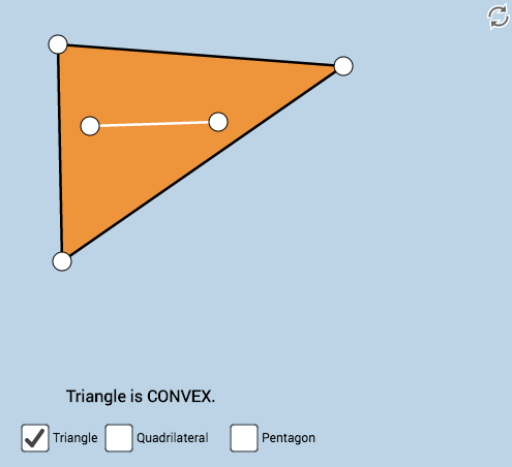
This example uses a dynamic color-coded approach to illustrate the difference between convex and concave polygons. Key mathematical concepts include polygons, similarity transformations, rotation, equations, and arithmetic mean. It utilizes commands such as Polygon, PointIn, Segment, and Angle in GeoGebra. Suitable for high school mathematics education and learning.
GeoGebra Commands & Parameters
Polygon(A, B, C) → poly1, c, a, bPointIn(poly1) → DPointIn(poly1) → ESegment(D, E) → fPolygon(C, B, F, A) → poly2, c_1, b_1, f_1, a_1Segment(C, B) → gSegment(B, F) → hSegment(F, A) → iSegment(A, C) → jAngle(C, B, F) → αAngle(B, F, A) → βAngle(F, A, C) → γAngle(A, C, B) → δPointIn(poly2) → GPointIn(poly2) → HSegment(G, H) → kPolygon(C, B, I, J, A) → poly3, c_2, b_2, i_1, j_1, a_2Angle(C, B, I) → εAngle(B, I, J) → ζAngle(I, J, A) → ηAngle(J, A, C) → θSegment(C, B) → lSegment(B, I) → mSegment(I, J) → nSegment(J, A) → pSegment(A, C) → qPointIn(poly3) → KPointIn(poly3) → LSegment(K, L) → rSegment(C, B) → sSegment(B, A) → tSegment(A, C) → g_1
AI Drawing Prompt Reference
Create a dynamic illustration comparing convex and concave polygons. Start with a triangle, place two random points inside it and connect them with a segment. Then, modify one vertex inward to form a concave quadrilateral, label all its interior angles, and add two random interior points connected by a segment. Next, construct a concave pentagon with labeled angles and an interior segment between two random points. Use distinct colors to differentiate convex from concave shapes, emphasizing the geometric contrast through interior segments and angle markings.
The prompt above was compiled from the original drawing commands and is for reference only.