
Converting Numbers Between Standard and Expanded Form
Loading the math board and drawing, please wait…
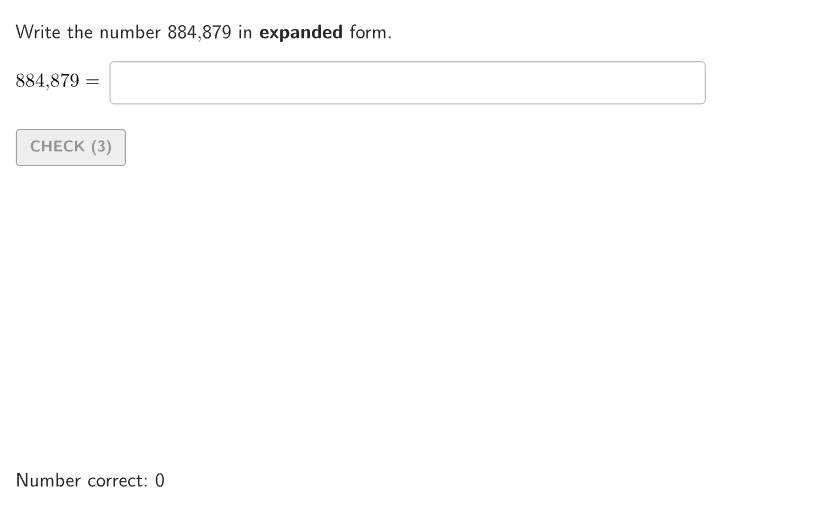
This example demonstrates converting multi-digit numbers between standard and expanded notation using an animated conversion machine. Key math concepts include reading, writing, and comparing whole numbers. Construction involves GeoGebra commands like Shuffle, Take, Text, Sum, and others to visualize the process. Suitable for elementary students in grades 4-5 for practice and classroom use.
GeoGebra Commands & Parameters
Shuffle(Sequence[ii / 100, ii, 1, 99]) → allRandomSeeds, {0.23, 0.88, 0.48, 0.79, 0.41, 0.03, 0.04, 0.75, 0.84, 0.07, 0.08, 0.14, 0.57, 0.24, 0.7, 0.98, 0.15, 0.37, 0.32, 0.93, 0.66, 0.21, 0.86, 0.8, 0.27, 0.58, 0.47, 0.71, 0.78, 0.09, 0.53, 0.9, 0.72, 0.35, 0.74, 0.2, 0.17, 0.54, 0.69, 0.39, 0.31, 0.76, 0.36, 0.85, 0.1, 0.97, 0.49, 0.73, 0.25, 0.68, 0.67, 0.55, 0.11, 0.12, 0.34, 0.44, 0.56, 0.43, 0.05, 0.51, 0.95, 0.6, 0.18, 0.91, 0.87, 0.4, 0.61, 0.83, 0.99, 0.26, 0.5, 0.45, 0.3, 0.89, 0.33, 0.06, 0.65, 0.02, 0.38, 0.96, 0.29, 0.19, 0.22, 0.13, 0.01, 0.46, 0.81, 0.16, 0.52, 0.77, 0.92, 0.59, 0.82, 0.94, 0.63, 0.28, 0.42, 0.62, 0.64}Take(allRandomSeeds, randIndex, randIndex + numRandoms - 1) → currentRandomSeedsText(randomNum2) → textGivenNumTextToUnicode(textGivenNum) → textGivenNumUnicIf(textGivenNumUnic(-1) ≟ 48, textGivenNumexpanding, Append[textGivenNumexpanding, UnicodeToLetter[textGivenNumUnic(-1)]]) → textGivenNumExpandingCompZip(FromBase[TT, 10], TT, textGivenNumExpandingComp) → ForSolTableAppend(Take[ForSolTable, 1, floor(anim) - 1], Sum[Reverse[ForSolTable], Length[ForSolTable] - floor(anim) + 1]) → ForSolTable3Zip(Text[nn], nn, ForSolTable3) → ForSolTable3TIf(currentRandomSeeds(1) ≤ 0.5, 1, 2) → randomNumCaseAppend(Take[ForSolTable, 1, Length[ForSolTable] - floor(anim)], Sum[Reverse[ForSolTable], floor(anim)]) → ForSolTable2Zip(If[Length[TT] ≥ 4, (("\text{" * AddCommas[TT]) * "}"), TT], TT, ForSolTable3T) → ForSolTable3SpacesZip(If[Length[TT] ≥ 4, (("\text{" * AddCommas[TT]) * "}"), TT], TT, Zip[Text[nn], nn, ForSolTable2]) → ForSolTable2SpacesTextfield(input2) → InputBox1Sum(Append[Zip[(TT * "+"), TT, Take[textGivenNumExpandingComp, 1, Length[textGivenNumExpandingComp] - 1]], textGivenNumExpandingComp(-1)]) → TextToCompareZip(If[Length[TT] ≥ 4, AddCommas[TT], TT], TT, textGivenNumexpanding) → textGivenNumexpandingWithSpacesAppend(textGivenNumexpandingWithSpaces(1), Flatten[{Zip[("\,+\," * TT), TT, Take[textGivenNumexpandingWithSpaces, 2]], If[textGivenNumUnic(-1) ≠ 48, {("\,+\," * UnicodeToLetter[textGivenNumUnic(-1)])}, {}]}]) → textGivenNumExpPlusTextfield(input1) → InputBox2TextToUnicode(If[randomNumCase ≟ 1, textInput1, textInput2]) → inputCurrentIf(randomNumCase ≟ 2, correct2, correct1) → correctCorner(5) → layoutAppSizesectorPixels(A, B, C, haloPixels + 40, Corner[1], Corner[3], Corner[5]) → pulsingObjectsectorPixels(A, B, C, 40, Corner[1], Corner[3], Corner[5]) → displayAnglePointToPixels(Corner[onboardingDisplayText, 2], Corner[1], Corner[3], Corner[5]) → layoutOnboardingonboardingTextOffset(Corner[onboardingText, 1], Corner[onboardingText, 3], onboardingCase, Corner[1], Corner[3], Corner[5]) → OnboardingTextOffsetTableText(If[randomNumCase ≟ 2, ForSolTable2Spaces, ForSolTable3Spaces], "vr") → text1Text(text1, AnimPoint, true, true, 0, 0) → text2Translate(hGL, Vector[(Vector[Corner[4], Corner[1]] / 500 * 16)]) → hGL'Defined(IndexOf["+00", textInput1]) → a
AI Drawing Prompt Reference
Create an interactive math conversion demonstration interface featuring an animated conversion machine. Display a large multi-digit number at the center as input, either three or four digits. Include two input boxes at the top for user interaction. Below, show a table with two columns: the left column displays the expanded form place values (hundreds, tens, ones), and the right column shows their corresponding values. A header indicates whether it represents standard or expanded form. The conversion process includes animation effects where the number gradually expands into its decomposed form, with expanded parts connected by plus signs displayed below. Use a clean educational style with random number generation for practice exercises.
The prompt above was compiled from the original drawing commands and is for reference only.