
Converting Fractions to Decimals Using Long Division
Loading the math board and drawing, please wait…
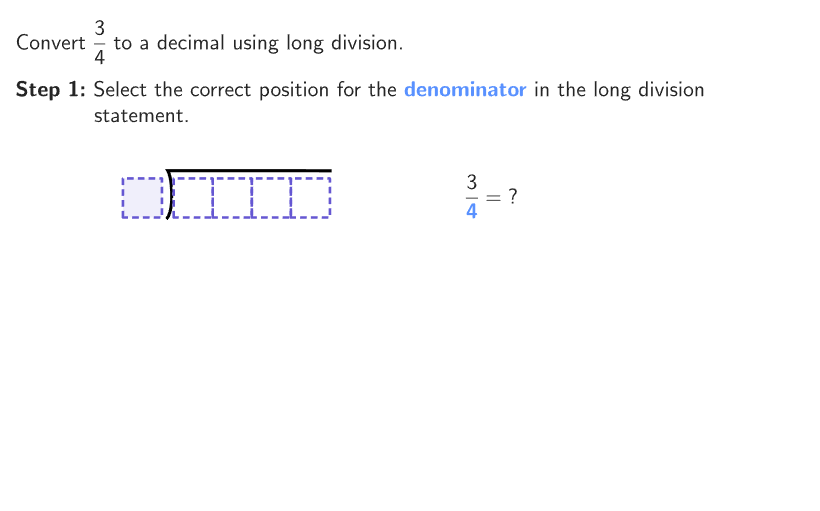
Demonstrate how to convert fractions to decimals using long division. Core math concepts include equivalence between fractions and decimals, long division operation, and determination of decimal places. Construction highlights the use of GeoGebra commands like Shuffle, Element, If, Zip, Polygon, Segment, Translate to create a long division model, showcasing the conversion process through random number generation and interactive operations. Suitable for 6-8 grade students learning the conversion between fractions and decimals, developing number sense.
GeoGebra Commands & Parameters
Shuffle(Join[Sequence[{A, A, A, A, A, A, A, A, A, A}, A, 1, 9]]) → randomDigits, {1, 9, 2, 4, 3, 9, 7, 5, 2, 8, 2, 2, 6, 5, 7, 5, 2, 9, 1, 7, 6, 6, 7, 5, 8, 2, 7, 6, 9, 5, 1, 8, 4, 7, 6, 3, 4, 3, 1, 3, 2, 9, 7, 2, 8, 6, 9, 8, 4, 1, 4, 1, 7, 1, 3, 6, 3, 7, 8, 9, 4, 3, 3, 7, 6, 8, 4, 1, 3, 6, 4, 5, 5, 2, 5, 9, 9, 4, 4, 6, 8, 5, 1, 2, 1, 3, 5, 8, 9, 8}Shuffle({{1, 2}, {1, 4}, {2, 4}, {3, 4}, {1, 5}, {2, 5}, {3, 5}, {4, 5}, {3, 6}, {1, 8}, {2, 8}, {3, 8}, {4, 8}, {5, 8}, {6, 8}, {7, 8}}) → randomPairs, {{3, 6}, {5, 8}, {3, 4}, {4, 5}, {1, 2}, {1, 8}, {3, 8}, {6, 8}, {2, 5}, {1, 4}, {2, 8}, {2, 4}, {3, 5}, {4, 8}, {7, 8}, {1, 5}}Element(randomPairs, randIndex, 1) → numerElement(randomPairs, randIndex, 2) → denomIf(ansThousandths ≠ 0, 3, If[ansHundredths ≠ 0, 2, 1]) → numDPZip((("$\text{" * A) * "~}$"), A, options) → selectDecimalPolygon({(0, 0), (0, 1), (1, 1), (1, 0)}) → boxTemplateSequence(Translate[boxTemplate, AnchorDiv + (A, 0)], A, 0, 3) → boxesDividendIf(numerPlaced ∧ denomPlaced, 2 + zeroIndex, NaN) → zeroPlaceSegment(AnchorDiv + (0, -1), AnchorDiv + (2, -1)) → divLine1Segment(AnchorDiv + (1, -3), AnchorDiv + (3, -3)) → divLine2Segment(AnchorDiv + (2, -5), AnchorDiv + (4, -5)) → divLine5Zip((("SetCaption(" * A) * ",emptyLabel)"), A, allBoxNames) → cmdEmptyLabelsZip(AnchorDiv + (0.15, -0.1) + A, A, {(0, 0), (1, 0), (1, -1), (2, -1), (1, -2), (2, -2), (2, -3), (3, -3), (2, -4), (3, -4), (3, -5), (0, 2), (1, 2), (2, 2), (3, 2), (-1, 1), (0, 1), (1, 1), (2, 1), (3, 1)}) → allAnchorsElement({numDP ≟ 1, numDP ≟ 2, numDP ≟ 3}, step - 3) → allDoneSegment(AnchorDiv + (2.5, 0), AnchorDiv + (2.5, -1)) → arrow1Segment(AnchorDiv + (3.5, 0), AnchorDiv + (3.5, -3)) → arrow2Segment(AnchorDiv + (0, -5.55), AnchorDiv + (3, -5.55)) → vRemainder3Segment(AnchorDiv + (0, -3.55), AnchorDiv + (2, -3.55)) → vRemainder2Segment(AnchorDiv + (0, -1.55), AnchorDiv + (1, -1.55)) → vRemainder1Translate(boxTemplate, AnchorDiv + (-1.3, 0)) → boxDivisor
AI Drawing Prompt Reference
Draw a long division model to convert a fraction to a decimal. Start by randomly generating a fraction with a numerator and denominator. Then, determine the decimal place based on the number of decimal places. Next, draw a rectangular box as the framework for long division, including positions for the dividend, divisor, and quotient. Finally, add arrows and lines to represent the long division process.
The prompt above was compiled from the original drawing commands and is for reference only.