
Continuity Under Composition with Natural Log Function
Loading the math board and drawing, please wait…
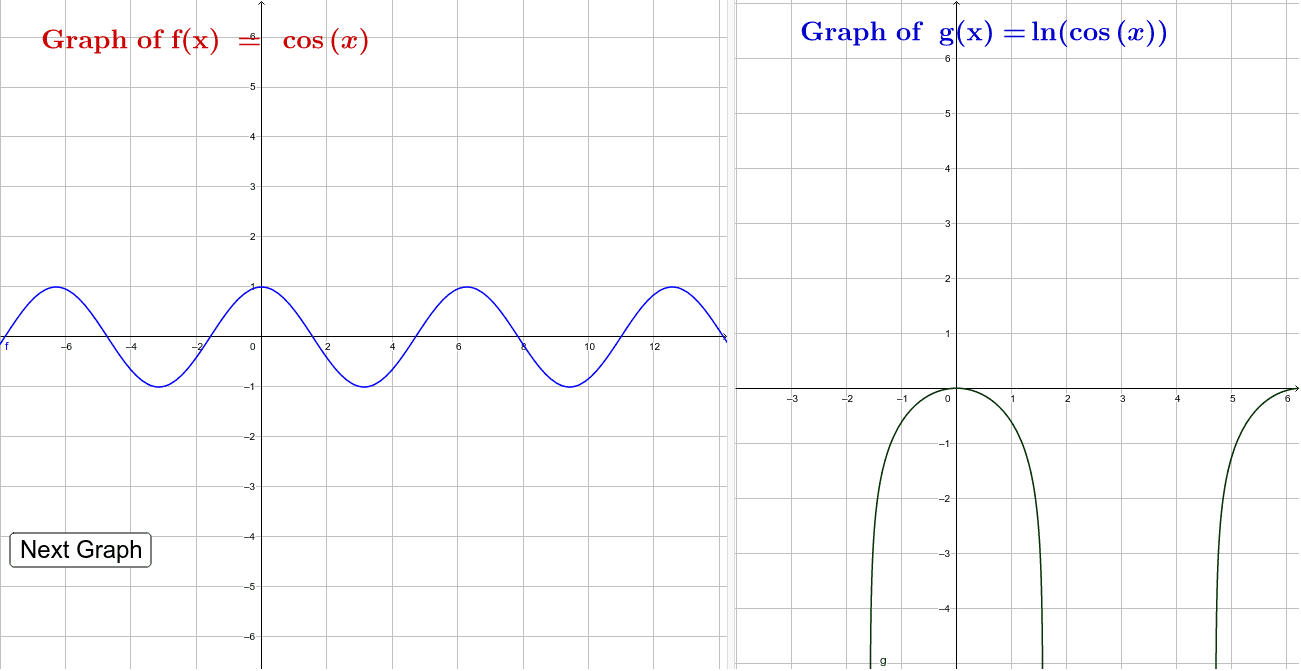
This applet explores continuity under composition with the natural log function. Key mathematical concepts include function continuity. Construction highlights include the use of RandomElement, buttons, and function objects. Suitable for high school math education or learning.
GeoGebra Commands & Parameters
RandomElement({-1, 1, 2, -2}) → aRandomElement({-2, 0, 1}) → cRandomElement({-3, 2, 1, 0}) → bRandomElement({x, Simplify[(a * x^(2)) + (b * x) + c], sin(x), cos(x), log(x), ℯ^(x)}) → f
AI Drawing Prompt Reference
Create a continuous function graph by composing a random polynomial function with the natural logarithm function. First, randomly select a coefficient a, then choose a constant c, next select a coefficient b for a quadratic polynomial, and finally pick one from x, polynomial function, sine function, cosine function, natural logarithm function, and exponential function as the composite function f.
The prompt above was compiled from the original drawing commands and is for reference only.