
Construction of a Double-Napped Cone: Visualizing Conic Sections
Loading the math board and drawing, please wait…
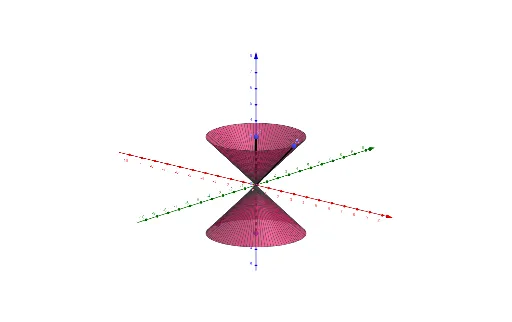
① This GeoGebra example dynamically constructs a double-napped cone to illustrate how conic sections (circle, ellipse, parabola, hyperbola) arise as intersections of a plane with the cone's surface. ② Core mathematical concepts include conic sections, solid geometry of cones, cross-sections, similarity transformations, and tangent lines. ③ Construction details: uses the Segment command to create generating lines (edges) of the cone, the Surface command to render the cone's surface, and objects such as A, B, C, D, f, g, and Spin to control the cone's shape and orientation, enabling exploration of different cutting planes. ④ Suitable for high school or early college students studying solid geometry and analytic geometry, serving as a visual aid for understanding the transition from 3D shapes to 2D curves and the classification of conic sections.
GeoGebra Commands & Parameters
Segment(D, C) → fSegment(A, B) → gSurface(g, Spin, f) → a
AI Drawing Prompt Reference
Draw a double cone using line segments AB and DC as generators, and generate the cone's surface by rotating line segment AB. Then, observe different conic sections such as circles, ellipses, parabolas, and hyperbolas by moving a plane to intersect the cone.
The prompt above was compiled from the original drawing commands and is for reference only.