
Constructing the Midpoint of a Line Segment
Loading the math board and drawing, please wait…
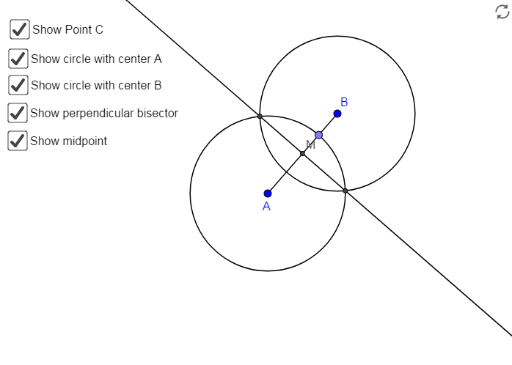
This example demonstrates how to construct the exact midpoint of any line segment using only a compass and straightedge (classical geometric construction). The core mathematical concepts include line segments, equilateral triangles, perpendicular bisectors, midpoint properties, and circle intersections. The construction involves drawing two circles of equal radius centered at the endpoints of the segment, then connecting their intersection points to form a line that crosses the original segment at its midpoint. From the construction summary, the GeoGebra commands used are Segment, Point, Circle, Intersect, and Line, with objects including segment AB, auxiliary circles c and d, intersection points C and D, line CD intersecting segment AB at point M, plus auxiliary point E and lines. This is suitable for middle school geometry lessons or self-study, helping students understand the logic of geometric construction and the intuitive application of theorems, while also serving as a clear demonstration of basic GeoGebra tools.
GeoGebra Commands & Parameters
Segment(A, B) → fPoint(f) → CCircle(A, Segment[A, C]) → cCircle(B, Segment[A, C]) → dIntersect(c, d, 1) → DIntersect(c, d, 2) → ELine(D, E) → gIntersect(g, f) → M
AI Drawing Prompt Reference
Draw a horizontal line segment with two endpoints. Using one endpoint as the center, draw a circle with radius equal to the distance from that endpoint to any point on the segment. Using the other endpoint as the center, draw another circle with the same radius. The two circles intersect at two points. Connect these two intersection points with a straight line. This line will cross the original segment at its midpoint. The figure should include the segment, two auxiliary circles, the two intersection points, the connecting line, and the midpoint.
The prompt above was compiled from the original drawing commands and is for reference only.