
Constructing Equilateral Triangles by 18taylorludwick
Loading the math board and drawing, please wait…
In collections
Exploring Constructions
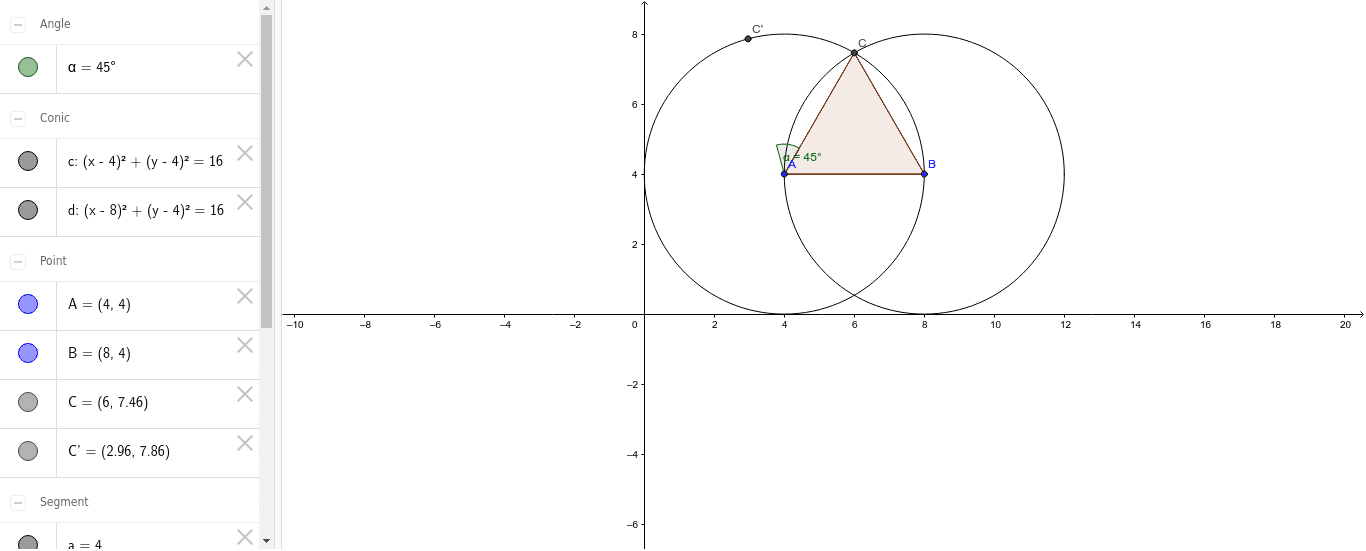
This example demonstrates how to construct an equilateral triangle using GeoGebra. Key math concepts include circles, intersections, segments, polygons, rotations, and angles. Construction steps involve creating a circle with the Circle command, finding intersections with Intersect, drawing segments with Segment, forming a polygon with Polygon, rotating parts with Rotate, and measuring angles with Angle. It is suitable for middle school students and above to learn geometric constructions and properties of equilateral triangles.
GeoGebra Commands & Parameters
Circle(A, B) → cCircle(B, A) → dIntersect(c, d, 1) → CSegment(A, B) → aSegment(A, C) → bSegment(B, C) → ePolygon(C, A, B) → poly1, b_1, c_1, a_1Rotate(C, 45*°, A) → C'Angle(C, A, C') → α
AI Drawing Prompt Reference
Draw an equilateral triangle by first creating two intersecting circles, connecting the center to the intersection points to form a triangle, then rotating a part of the triangle, and measuring the angle between the original and rotated shapes to show the relationship between rotation and angles.
The prompt above was compiled from the original drawing commands and is for reference only.