
Constructing a Tangent Line to a Quadratic Curve at a Point
Loading the math board and drawing, please wait…
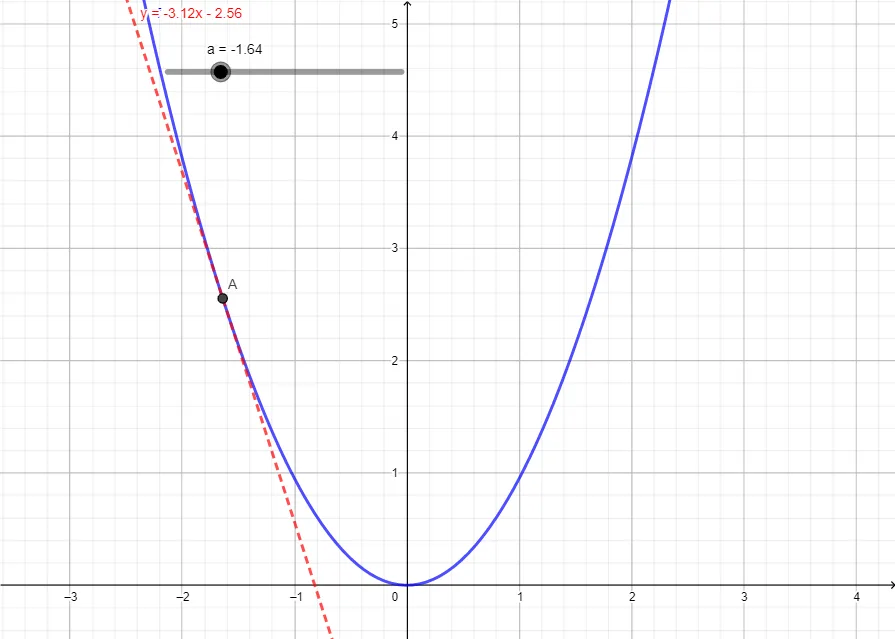
This example demonstrates how to construct the tangent line to a quadratic function (parabola) at a chosen point on the curve, highlighting the local linear approximation property: the tangent touches the curve at the contact point and shares the same slope there. Key concepts include quadratic functions, tangent lines, and the fact that the tangent slope is determined by the derivative (instantaneous rate of change / first-order contact). Construction outline from the GeoGebra build: objects k and f define the quadratic function, parameter/point objects a and A specify the tangency location, m computes the slope at that point, and T represents the resulting tangent line passing through the selected point with matching slope. Suitable for high school to introductory calculus learners, both for classroom demonstration and independent exploration of how derivatives relate to graphs.
GeoGebra Commands & Parameters
Numeric k(0.95)f(x) = (k * x^(2))Numeric a(-1.64)(a, f(a))(2 * (a * k))y - (k * a^(2)) = (m * (x - a))
AI Drawing Prompt Reference
Draw a parabola opening upwards with a vertex at (-1.64, 2.43) and its tangent line at that point. First, set the width of the parabola to 0.95, then draw the parabola. Next, identify the point of tangency as (-1.64, 2.43), calculate the slope of the tangent line as -3.22, and finally draw the tangent line passing through that point with a slope of -3.22.
The prompt above was compiled from the original drawing commands and is for reference only.