
Constructing a Special Triangle with Circle Intersections
Loading the math board and drawing, please wait…
In collections
Introductory Exercises
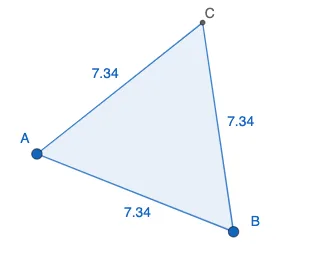
This GeoGebra example demonstrates how to build a special triangle by using circle-based constructions: selecting points on circles, computing their intersections, and then connecting the resulting vertices. The main mathematical ideas are circle construction, intersection geometry, and forming a triangle from constructed points; the setup highlights how geometric constraints determine key relationships among edges and positions. Construction-wise, the example relies on GeoGebra commands Circle, Intersect, and Polygon, together with objects such as A, B, C, and named parameters/points (e.g., t1, c_1, a, b), to (1) draw the relevant circle(s), (2) find intersection points that define the triangle’s vertices, and (3) connect those vertices to create the polygonal triangle. Suitable for middle-school geometry practice, geometry-construction lessons, and interactive exploration for learners preparing for higher-level problem solving.
GeoGebra Commands & Parameters
Circle(A, B) → cCircle(B, A) → dIntersect(c, d, 1) → CPolygon(A, B, C) → t1, c_1, a, b
AI Drawing Prompt Reference
Draw two circles with equal radii, each centered at one of two fixed points and passing through the other point. The circles intersect at two points; choose one intersection as the third vertex. Connect the two fixed points and this chosen vertex with straight line segments to form a triangle. The final figure shows two overlapping circles and a triangle whose vertices are the two centers and one intersection point.
The prompt above was compiled from the original drawing commands and is for reference only.