
Constructing a Parabola via Focus and Directrix
Loading the math board and drawing, please wait…
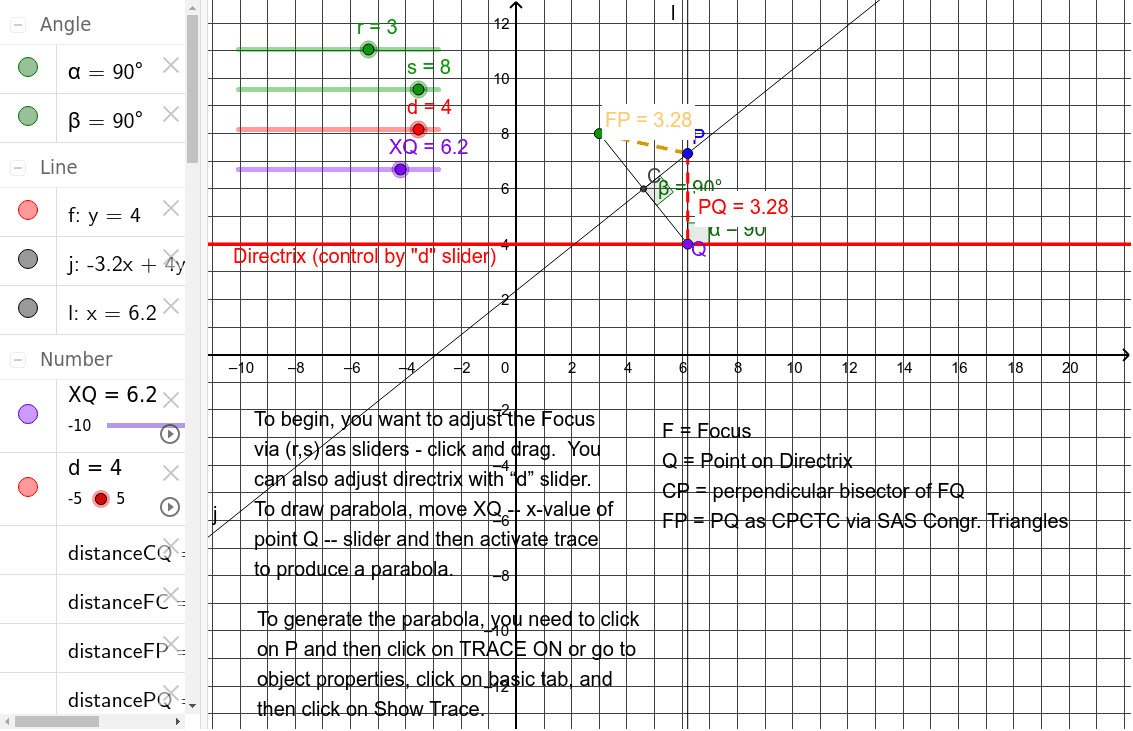
This example demonstrates how to draw a parabola using its focus and directrix. Key math concepts involved include the geometric definition of a parabola, the distance from a point to a line formula, and angle calculations. The construction highlights the use of GeoGebra commands such as Segment, Midpoint, OrthogonalLine, Intersect, Distance, and Angle to create auxiliary lines and verify the parabola's definition. Suitable for high school mathematics education to understand the geometric properties and construction methods of parabolas.
GeoGebra Commands & Parameters
Segment(F, Q) → iMidpoint(i) → COrthogonalLine(C, i) → jOrthogonalLine(Q, f) → lIntersect(j, l) → PSegment(F, P) → FPDistance(F, P) → distanceFPDistance(P, Q) → distancePQAngle(f, l) → αAngle(j, i) → βDistance(F, C) → distanceFCDistance(C, Q) → distanceCQSegment(P, Q) → PQ
AI Drawing Prompt Reference
Draw a parabola defined by a focus and a directrix. Start by drawing a line segment between the focus and the directrix, then find the midpoint of this segment and draw a perpendicular line through it. Next, draw a perpendicular line from any point on the directrix to the focus; their intersection is a point on the parabola. Repeat this process to find more points and connect them to form the parabola. Optionally, measure the distances from the focus to the midpoint, from the midpoint to points on the directrix, and from the focus to the intersection points, as well as the relevant angles, to verify the geometric definition of the parabola.
The prompt above was compiled from the original drawing commands and is for reference only.