
Constructing a Parabola Equation with GeoGebra
Loading the math board and drawing, please wait…
In collections
geometriadinamica.es
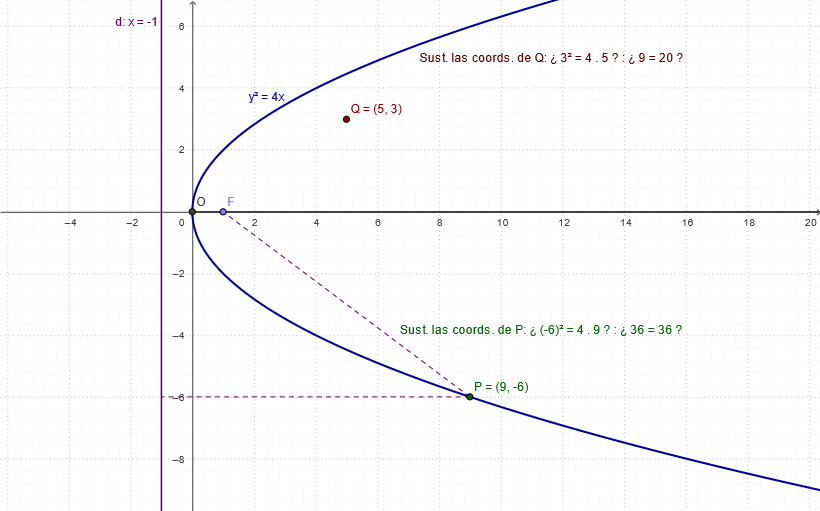
This example demonstrates how to construct a parabola in GeoGebra using geometric constraints that reflect its defining properties. It focuses on the core ideas of conic sections—especially the parabola definition via equal distance to a focus and a directrix (or equivalent geometric conditions)—and connects these geometric relationships to the corresponding equation/function graph representation. Construction highlights include using Intersect to generate key intersection points, Point to define characteristic locations, Ray and Segment to build the lines used in the distance/relationship framework, Mirror to apply symmetry where needed, and OrthogonalLine to enforce perpendicular relationships that underpin the parabola property. The construction objects listed in the summary (e.g., key points such as O, F, and constructed points like P, Q, and T1, T2) guide the formation of the curve/related geometric structure. Suitable for secondary school through early college students studying analytic geometry, functions, and graphical construction in math labs.
GeoGebra Commands & Parameters
Intersect(xAxis, yAxis) → OPoint(xAxis) → ARay(OO, A) → aPoint(a) → FMirror(F, O) → BOrthogonalLine(B, xAxis) → dPoint(c) → PSegment(P, F) → bOrthogonalLine(P, d) → eIntersect(d, e) → CSegment(P, C) → f
AI Drawing Prompt Reference
Draw a parabola by first taking point O on the x-axis as the origin, then taking point A on the x-axis, and drawing a ray a through O and A. Take point F on the ray a as the focus, and take point B as the mirror image of F on the x-axis, drawing a vertical line d through B. Take point P on line d, drawing a line segment b through P and F, and drawing a vertical line e through P. The intersection point C of lines d and e is a point on the parabola, and line segment f connects P and C.
The prompt above was compiled from the original drawing commands and is for reference only.