
Constructing a Histogram with Data Set
Loading the math board and drawing, please wait…
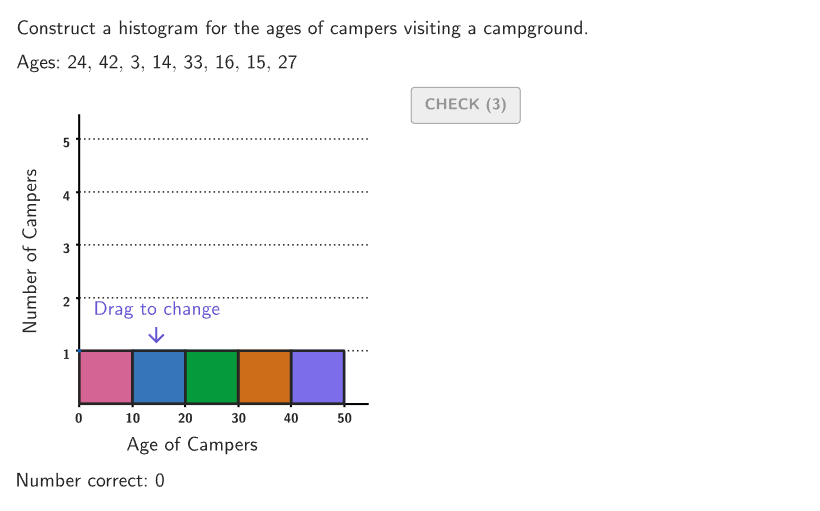
This interactive activity demonstrates how to build a histogram using a data set. The core math concepts involved are probability & statistics, specifically histogram construction methods. Key GeoGebra commands used include Shuffle, If, Take, CountIf, Sum, Zip, Element, twoPointBox, Polygon, Mod, VerticalText, Sequence, Segment, and onboardingTextOffset. It is suitable for students in grades 6-8 to learn how to organize and compare one set of information in histograms and bar graphs.
GeoGebra Commands & Parameters
Shuffle(Sequence[15]) → randomList2, {12, 3, 1, 2, 10, 11, 6, 9, 5, 4, 15, 13, 8, 14, 7}Shuffle({1, 2, 3, 4}) → ansOrder, {4, 1, 3, 2}Shuffle(Sequence[1, 5]) → shuffleOrder, {5, 4, 1, 3, 2}Shuffle(Remove[Sequence[1, 49], {10, 20, 30, 40}]) → randomAges, {24, 42, 3, 14, 33, 16, 15, 27, 9, 25, 49, 23, 37, 45, 38, 4, 41, 32, 22, 44, 28, 6, 34, 13, 17, 12, 39, 36, 48, 46, 35, 29, 7, 8, 43, 21, 18, 1, 26, 5, 19, 31, 47, 2, 11}If((2 * countQuestion) + 9 < 45, (2 * countQuestion) + 1, 1) → startIndexTake(randomAges, startIndex, startIndex + 7) → agesCountIf(40 < A < 50, A, ages) → ans5CountIf(30 < A < 40, A, ages) → ans4CountIf(20 < A < 30, A, ages) → ans3CountIf(A < 10, A, ages) → ans1CountIf(10 < A < 20, A, ages) → ans2Sum(Zip[(("" * A) * B), A, Sort[ages], B, {", ", ", ", ", ", ", ", ", ", ",\\", ", ", ""}]) → textAgesSortedZip(If[A ≟ 0, "no one", If[A ≟ 1, "one person", (("" * A) * " people")]], A, {ans1, ans2, ans3, ans4, ans5}) → countsElement(randomList2, Mod[countQuestion, 15] + 1) → randomNum2twoPointBox(Bar1a, Bar1b) → bar1twoPointBox(Bar2a, Bar2b) → bar2twoPointBox(Bar3a, Bar3b) → bar3twoPointBox(Bar4a, Bar4b) → bar4twoPointBox(Bar5a, Bar5b) → bar5Polygon({(-10, -1), (-10, 5.5), (55, 5.5), (55, -1)}) → viewboxZip(twoPointBox[A, B], A, {Bar1a, Bar2a, Bar3a, Bar4a, Bar5a}, B, {Bar1b, Bar2b, Bar3b, Bar4b, Bar5b}) → barOutlinesMod(shuffleOrder(countQuestion + 1), 5) → ans3TempVerticalText("Number of Campers") → labelYSequence(Segment[(0, A), (55, A)], A, 1, 5) → horizGridsSum(Zip[("" * (A * B)), A, ages, B, {}]) → agesLatexSum(Zip[((("" * A) * B) * " "), A, ages, B, {",", ",", ",", ",", ",", ",", ",", ""}]) → agesTextZip(A + SolnAnchor, A, barPositions) → solnPositionsZip(SolnAnchor + (A, B), A, {0, 10, 20, 30, 40}, B, {ans1, ans2, ans3, ans4, ans5}) → solnPointsZip(twoPointBox[A, A + (10, 0)], A, solnPoints) → solnOutlinesZip(Text[("" * A), SolnAnchor + (0, A), true, true, -1, 0], A, {1, 2, 3, 4, 5}) → solnNumbersYSequence(Segment[SolnAnchor + (-1, i), SolnAnchor + (0, i)], i, 1, 5) → solnTicksYSequence(Segment[SolnAnchor + (i, -0.1), SolnAnchor + (i, 0)], i, 10, 50, 10) → solnTicksXSequence(Text[("" * A), SolnAnchor + (A, 0), true, true, 0, -1], A, 0, 50, 10) → solnNumbersXtwoPointBox(solnPoints(1), solnPoints(1) + (10, 0)) → soln1twoPointBox(solnPoints(2), solnPoints(2) + (10, 0)) → soln2twoPointBox(solnPoints(3), solnPoints(3) + (10, 0)) → soln3twoPointBox(solnPoints(4), solnPoints(4) + (10, 0)) → soln4twoPointBox(solnPoints(5), solnPoints(5) + (10, 0)) → soln5VerticalText("\text{Number of Campers\\\vspace{245px}\\Number of Campers}") → lblSolnYSequence(Segment[SolnAnchor + (0, A), SolnAnchor + (55, A)], A, 1, 5) → solnGridsIf(showsolution, 200, 140) → maxXIf(showsolution, -20, -15) → minXSequence(Text[("" * A), (0, 0) + (A, 0), true, true, 0, -1], A, 0, 50, 10) → questionNumbersXZip(Text[("" * A), (0, 0) + (0, A), true, true, -1, 0], A, {1, 2, 3, 4, 5}) → questionNumbersYSegment(Bar1a, Bar1a) → startBar1onboardingTextOffset(Corner[onboardingText, 1], Corner[onboardingText, 3], onboardingCase, Corner[1], Corner[3], Corner[5]) → OnboardingTextOffsettwoPointBox(Bar2a, Bar2b) → pulsingQuadSegment(Bar1a, Bar1b) → StartMarker1Segment(Bar2a, Bar2b) → StartMarker2Segment(Bar3a, Bar3b) → StartMarker3Segment(Bar4a, Bar4b) → StartMarker4Segment(Bar5a, Bar5b) → StartMarker5
AI Drawing Prompt Reference
Create a histogram to represent the distribution of age data. First, randomly shuffle and group the age data, then count the number of people in each age range (0-9, 10-19, 20-29, 30-39, 40-49). Use these counts to draw the histogram on a coordinate plane, with the x-axis representing age ranges and the y-axis representing the number of people. Each bar's height corresponds to the number of people in the respective age range, and bars should touch each other without gaps. Finally, add Y-axis and X-axis labels, as well as X-axis and Y-axis tick marks.
The prompt above was compiled from the original drawing commands and is for reference only.