
Constructing a Directed Line Segment with Parametric Controls in GeoGebra
Loading the math board and drawing, please wait…
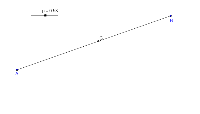
This example demonstrates how to construct a directed line segment in GeoGebra using parametric controls. It illustrates the vector representation of a line segment, parametric equations, and geometric construction techniques. By employing the Segment command with objects A, B, a, p, and C, users can dynamically observe how the segment's endpoints move as parameters change. The activity is suitable for high school and early university students studying vector geometry and parametric curves.
GeoGebra Commands & Parameters
Segment(A, B) → a
AI Drawing Prompt Reference
Draw a directed line segment with two endpoints, one as the start and the other as the end, clearly indicating direction with an arrow or color. The segment should be a solid line, with parametric control points so that adjusting parameters dynamically changes the segment's position and length. The composition should clearly illustrate the directional and parametric nature of the segment for educational demonstration.
The prompt above was compiled from the original drawing commands and is for reference only.