
Constructing a Cube
Loading the math board and drawing, please wait…
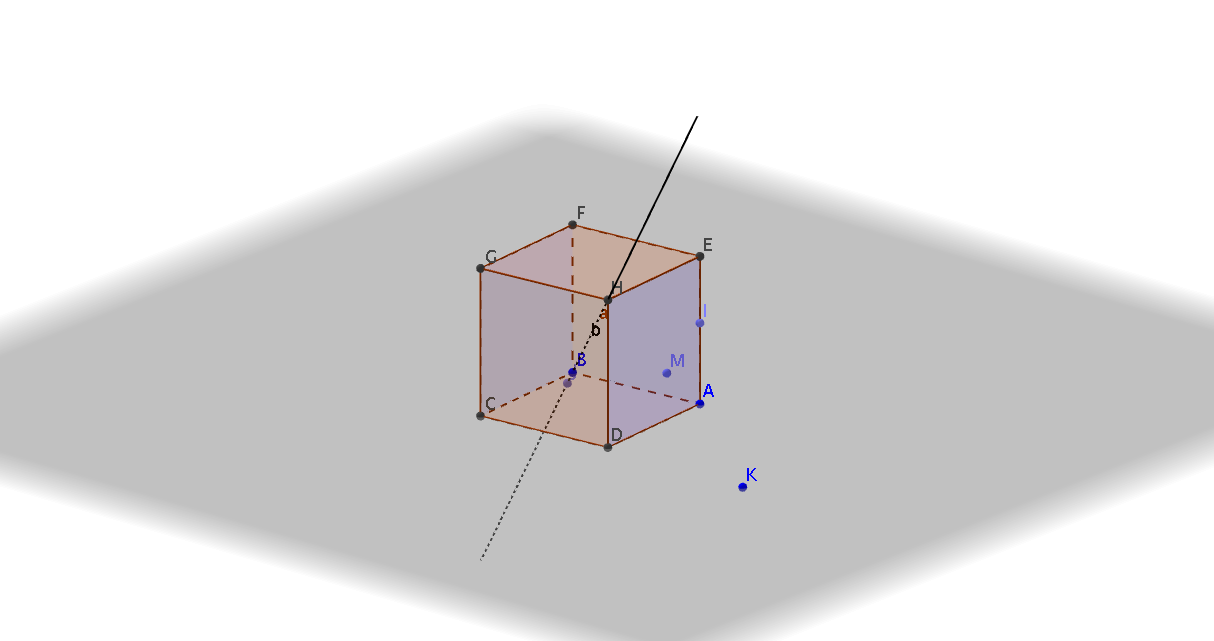
This example demonstrates the construction of a cube. Key mathematical concepts include solid geometry, points, lines, and vectors. Using GeoGebra commands such as Cube, Point, and Line, the various faces and edges of the cube are constructed. Suitable for students at the middle school level and above for learning solid geometry.
GeoGebra Commands & Parameters
Cube(A, B, xOyPlane) → a, C, faceBCGF, faceCDHG, faceEFGH, edgeAD, edgeAB, edgeBC, edgeCD, edgeAE, edgeDH, edgeEH, D, edgeEF, edgeBF, edgeFG, edgeCG, edgeGH, E, F, G, H, faceABCD, faceADHE, faceABFEPoint(edgeAE) → ILine(H, B) → bPoint(b) → JPointIn(faceABFE) → M
AI Drawing Prompt Reference
Draw a cube with 8 vertices and 12 edges. First, construct the cube using points A and B and the xOy plane, which gives vertices C, D, E, F, G, H and faces BCGF, CDHG, EFGH, etc. Then, take point I on edge AE, point J on line HB, and point M in face ABFE.
The prompt above was compiled from the original drawing commands and is for reference only.