
Construct Rectangular Prisms with Given Surface Area
Loading the math board and drawing, please wait…
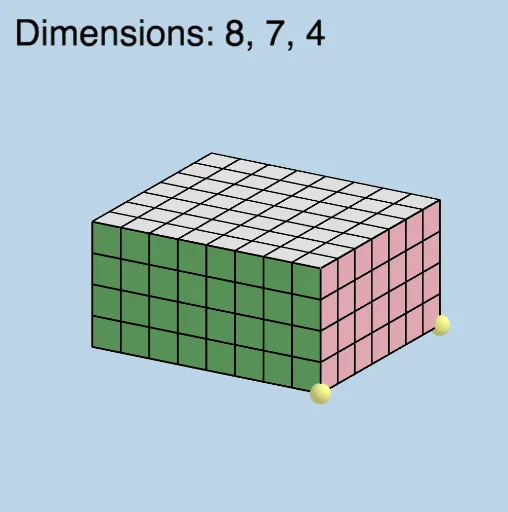
This example demonstrates how to construct rectangular prisms given a specific surface area. Key mathematical concepts include the calculation of the surface area of a rectangular prism. Using GeoGebra commands such as Ray, Prism, Net, etc., the dimensions of the prism can be dynamically adjusted. Suitable for middle school and above students learning solid geometry.
GeoGebra Commands & Parameters
Ray((0, 0, 0), (1, 0, 0)) → fRay((0, 0, 0), (0, 1, 0)) → gRay((0, 0, 0), (0, 0, 1)) → hPrism(E, A, D, B, C) → d, F, edgeAE, edgeAD, edgeBD, edgeBE, edgeCE, edgeAF, edgeDG, edgeBH, edgeCF, edgeFG, G, edgeGH, edgeCH, H, faceADBE, faceAECF, faceADGF, faceBDGH, faceBECH, faceCFGHNet(d, openclose) → i, I, R, S, T, U, V, faceIJKL, faceIJNM, faceJKPO, faceKLRQ, faceILST, J, faceMNUV, edgeIJ, edgeJK, edgeKL, edgeIL, edgeIM, edgeMN, edgeJN, edgeJO, edgeOP, K, edgeKP, edgeKQ, edgeQR, edgeLR, edgeLS, edgeST, edgeIT, edgeNU, edgeUV, edgeMV, L, M, N, O, P, QSequence(Segment[(i, 0, 0), (i, WIDTH, 0)], i, 1, LENGTH - 1, 1) → L_1Translate(L_1, Vector[A, F]) → L_2Sequence(Segment[(0, i + 1, 0), (LENGTH, i + 1, 0)], i, 0, WIDTH - 2) → L_3Translate(L_3, Vector[A, F]) → L_4Vector(M, V) → uSequence((x(M) + i, y(M), z(M)), i, 1, LENGTH - 1, 1) → L_5Translate(L_5, u) → L_6Sequence(Segment[Element[L_5, i], Element[L_6, i]], i, 1, LENGTH - 1) → L_7Sequence((x(M), y(M) + (i * y(u) / WIDTH), z(M) + (i * z(u) / WIDTH)), i, 1, WIDTH - 1, 1) → L_8Vector(V, U) → vTranslate(L_8, v) → L_9Sequence(Segment[Element[L_8, i], Element[L_9, i]], i, 1, WIDTH - 1) → L_{10}Vector(A, O) → wSequence((x(A) + (i * x(w) / HEIGHT), y(A), z(A) + (i * z(w) / HEIGHT)), i, 1, HEIGHT - 1, 1) → L_{11}Vector(O, P) → lTranslate(L_{11}, l) → L_{12}Sequence(Segment[Element[L_{11}, i], Element[L_{12}, i]], i, 1, HEIGHT - 1) → L_{13}Sequence((x(O), y(O) + (i * y(l) / WIDTH), z(O) + (i * z(l) / WIDTH)), i, 1, WIDTH - 1, 1) → L_{14}Translate(L_{14}, Vector[(-w)]) → L_{15}Sequence(Segment[Element[L_{14}, i], Element[L_{15}, i]], i, 1, WIDTH - 1) → L_{16}Mirror(L_{13}, k) → L_{17}Mirror(L_{16}, k) → L_{18}Vector(D, Q) → mSequence((x(B) + (i * x(v) / LENGTH), y(B), z(B)), i, 1, LENGTH - 1, 1) → L_{19}Translate(L_{19}, m) → L_{20}Sequence(Segment[Element[L_{19}, i], Element[L_{20}, i]], i, 1, LENGTH - 1) → L_{21}Sequence((x(B), y(B) + (i * y(m) / HEIGHT), z(B) + (i * z(M) / HEIGHT)), i, 1, HEIGHT - 1, 1) → L_{22}Translate(L_{22}, v) → L_{23}Sequence(Segment[Element[L_{22}, i], Element[L_{23}, i]], i, 1, HEIGHT - 1) → L_{24}Mirror(L_{21}, n) → L_{25}Mirror(L_{24}, n) → L_{26}RandomElement(l2) → aMode(l2) → l3IndexOf(a, l2) → eElement(l2, e + 1) → jElement(l2, e + 2) → oElement(l2, e + 3) → pCountIf(x ≟ a, l2) → qIf(q ≟ 1, "There is 1 solution here.", q ≟ 2, "There are 2 solutions here.", q ≟ 3, "There are 3 solutions here.") → text2
AI Drawing Prompt Reference
Draw a rectangular prism with a given surface area. Start by creating rays for the three axes, then construct the prism based on the given dimensions. Next, draw the net of the prism. Finally, generate the faces and edges of the prism based on the net.
The prompt above was compiled from the original drawing commands and is for reference only.