
Construct a Triangle with Given Area: Quick Formative Assessment
Loading the math board and drawing, please wait…
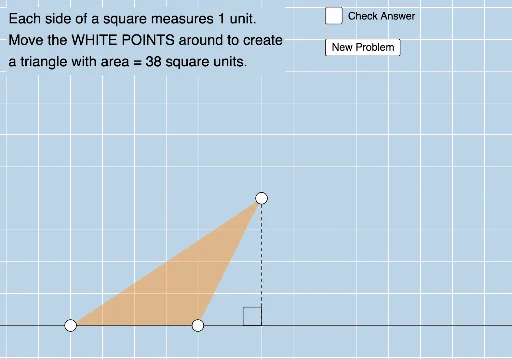
① This example demonstrates how to construct a triangle that meets a specified area requirement through dynamic interaction, with immediate feedback to assess student understanding. ② Core math concepts include the triangle area formula, base-height relationships, geometric construction, and algebraic verification, covering area, perimeter, line segments, special points, ratios, and basic algebra. ③ Construction highlights: GeoGebra commands such as Point, Polygon, OrthogonalLine, Intersect, Segment, Angle, Line, Sequence, and RandomElement are used to build the triangle and auxiliary lines, while buttons and text objects (button1, validate, correct, text1/2/3) enable validation and feedback. ④ Suitable for middle or high school quick quizzes or formative assessments, helping students solidify area concepts and enhance geometric construction and algebraic reasoning skills.
GeoGebra Commands & Parameters
Point(xAxis) → APoint(Ray[(x(A) + 1, 0), (x(A) + 2, 0)]) → BPolygon(A, C, B) → t1, b, a, cOrthogonalLine(C, xAxis) → fIntersect(f, xAxis) → DSegment(C, D) → gAngle(C, D, B) → αLine(A, B) → hSequence((2 * i), i, 3, 25, 1) → L_1RandomElement(L_1) → d
AI Drawing Prompt Reference
On a coordinate plane, place a point on the horizontal axis as the first vertex of a triangle, then place a second point on the same axis to its right. Choose a third point above the axis and connect all three to form a triangle. From the third vertex, draw a perpendicular line down to the horizontal axis, marking the foot of the perpendicular and the right angle between the foot and the second vertex. Draw the base segment along the axis between the first two vertices. Additionally, generate a sequence of equally spaced tick marks along the base and randomly select one value from them, which will be used to check if the triangle's area meets a specified target.
The prompt above was compiled from the original drawing commands and is for reference only.