
Connecting Unit Circle to Sine, Cosine and Tangent
Loading the math board and drawing, please wait…
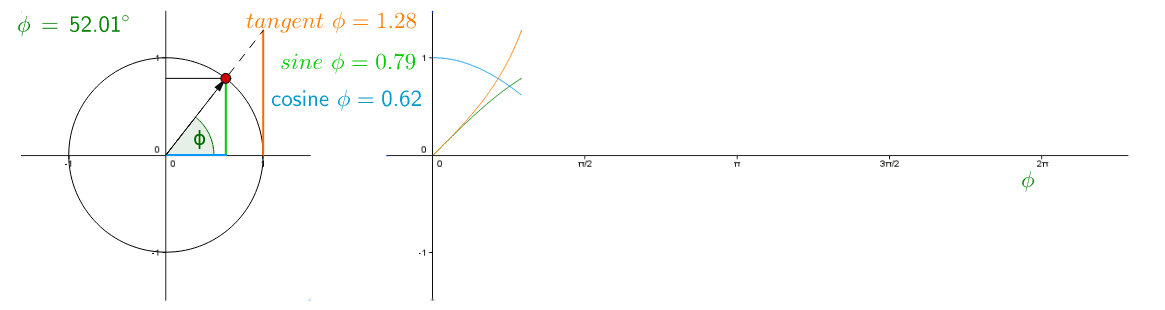
This example demonstrates the functional correlation between angular functions using the unit circle. It involves core mathematical concepts such as sine, cosine, and tangent functions. Using GeoGebra commands like Intersect, Circle, Point, etc., students can observe the relationship between angles and trigonometric function values. Suitable for high school mathematics education.
GeoGebra Commands & Parameters
Intersect(xAxis, yAxis) → ACircle(A, B) → cPoint(c) → COrthogonalLine(C, xAxis) → bOrthogonalLine(C, yAxis) → dIntersect(d, yAxis) → DIntersect(b, xAxis) → EVector(A, C) → uAngle(B, A, C) → ϕSegment(D, C) → aSegment(E, C) → eLine(B, yAxis) → fLine(A, C) → gIntersect(f, g) → FSegment(A, E) → iSegment(B, F) → jLaTeX(ϕ, true, true) → Text1Function(sin(x - x(G)), x(G), x(J)) → hFunction(cos(x - x(G)), x(G), x(J)) → rFunction(tan(x - x(G)), x(G), x(J)) → sSegment(A, F) → k
AI Drawing Prompt Reference
Draw a unit circle and connect the sine, cosine, and tangent functions. Start by drawing the unit circle, then draw the sine, cosine, and tangent lines through points on the circle to observe the relationship between angles and trigonometric function values.
The prompt above was compiled from the original drawing commands and is for reference only.