
Conic Sections - The Apollonian Way
Loading the math board and drawing, please wait…
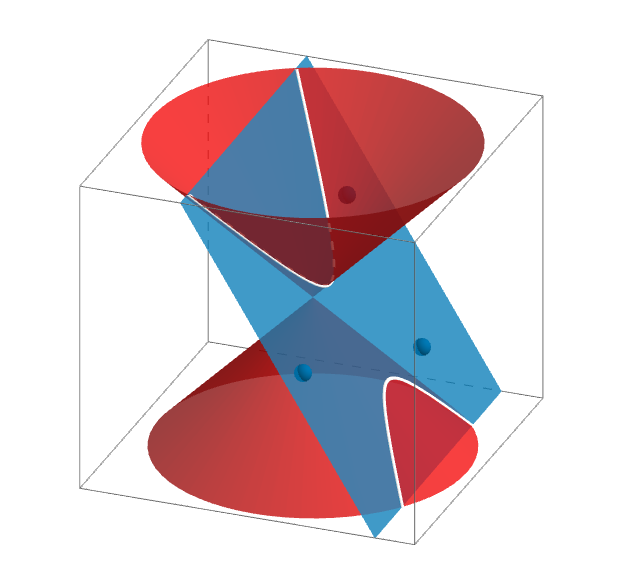
This GeoGebra example demonstrates the classical Apollonian construction of conic sections by intersecting a cone with a plane in 3D space. It visually shows how ellipses, parabolas, and hyperbolas arise as cross-sections of a cone, linking solid geometry to plane curves. The core mathematical concepts include conic sections, plane-cone intersection, and the geometric properties of these curves. The construction uses GeoGebra commands such as Cone to create the cone, Plane to define the cutting plane, IntersectPath to obtain the intersection curve, and Corner to mark special points, with auxiliary objects A1, A2, A3, etc. This is suitable for high school or early college students learning the unified origin of conic sections, and serves as an interactive teaching tool for exploring how varying the plane's orientation changes the resulting curve.
GeoGebra Commands & Parameters
Cone(A3, A2, 5) → a, c, bCone(A1, A2, 5) → d, e, fPlane(P1, P3, P2) → gIntersectPath(g, a) → hCorner(h) → A, B, C, DIntersectPath(g, d) → k
AI Drawing Prompt Reference
Draw a 3D cone with its apex at the top and a circular base. Overlap it with a second cone having a different apex, creating a symmetric solid. Use an inclined plane to cut through both cones. The intersection of the plane with the first cone forms a closed curve, and with the second cone forms another curve. Mark four special points on the first curve, located at its endpoints or turning points. The overall scene shows how conic sections arise from plane-cone intersections, illustrating ellipses, parabolas, or hyperbolas.
The prompt above was compiled from the original drawing commands and is for reference only.