
Congruent Triangles Demo
Loading the math board and drawing, please wait…
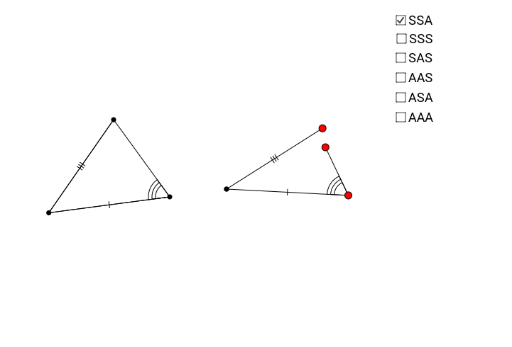
This example demonstrates the properties and criteria of congruent triangles. It involves core mathematical concepts like congruence, triangles, continuity, unit circle, linear functions, 2D vectors, and fractal geometry. Construction highlights include commands and objects such as Segment, Angle, Circle, Point, Rotate, Line, Polygon, DynamicCoordinates, If, Intersect. Suitable for high school students learning geometric constructions and proofs, understanding complex geometric relationships.
GeoGebra Commands & Parameters
Segment(C, A) → bAngle(A, C, B) → γ_cSegment(B, C) → a_cSegment(A, B) → c_cAngle(B, A, C) → α_cAngle(C, B, A) → β_cCircle(H, c_c) → k_{cSSA}Circle(H, a_c) → p_{aSSA}Point(p_{aSSA}) → IPoint(k_{cSSA}) → JCircle(I, b) → q_{bSSA}Segment(H, I) → lSegment(H, J) → mRotate(H, (-γ_c), I) → H'Angle(H', I, H) → δLine(H', I) → dPoint(d) → DPolygon(C, A, B) → poly1, b_{O}, c_{O}, a_{O}Polygon(H, J, D, I) → poly2_1, h, j, b_{SSAc}, iDynamicCoordinates(D, If[Distance[D, J] < 0.13, x(J), x(D)], If[Distance[D, J] < 0.13, y(J), y(D)]) → ESegment(E, I) → b_{SSA}Polygon(H, I, E) → poly3, e_1, h_1, i_1If(poly1 - 1.5 ≤ poly2_1 ≤ poly1 + 1.5 ∧ E ≟ J, true, false) → gCircle(H_1, c_c) → k_{cSSS}Circle(H_1, a_c) → p_{aSSS}Point(p_{aSSS}) → I_1Point(k_{cSSS}) → J_1Circle(I_1, b) → q_{bSSS}Segment(H_1, I_1) → l_1Segment(H_1, J_1) → m_1Point(q_{bSSS}) → K_1Segment(I_1, K_1) → n_1Segment(B, A) → cSegment(A, C) → b_cSegment(B, C) → aDynamicCoordinates(K_1, If[Distance[J_1, K_1] < 0.13, x(J_1), x(K_1)], If[Distance[K_1, J_1] < 0.13, y(J_1), y(K_1)]) → FPolygon(J_1, H_1, I_1) → poly4, i_2, j_2, h_2Point(p_{aSSS}) → GSegment(H_1, G) → eRotate(G, β_c, H_1) → G'Angle(G, H_1, G') → αLine(H_1, G') → fIntersect(k_{cSSA}, f, 2) → KSegment(G, L) → kSegment(H_1, K) → nDynamicCoordinates(L, If[Distance[K, L] < 0.13, x(K), x(L)], If[Distance[L, K] < 0.13, y(K), y(L)]) → MPolygon(H_1, G, M) → poly2, m_2, h_3, g_1Point(p_{aSSS}) → NRotate(N, β_c, H_1) → N'Angle(N, H_1, N') → βRotate(H_1, α_c, N') → OLine(H_1, N) → pSegment(H_1, N) → sLine(H_1, N') → qPoint(q) → PRotate(H_1, α_c, P) → QAngle(H_1, P, Q) → γLine(P, Q) → rSegment(H_1, P) → tPoint(r) → RSegment(P, R) → a_1DynamicCoordinates(R, If[Distance[N, R] < 0.13, x(N), x(R)], If[Distance[R, N] < 0.13, y(N), y(R)]) → SPolygon(S, H_1, P) → poly5, p_1, s_1, h_4Point(p_{aSSA}) → TRotate(T, β_c, H_1) → T'Angle(T, H_1, T') → εRotate(H_1, (-γ_c), T) → UAngle(U, T, H_1) → ζLine(H_1, T') → b_1Line(U, T) → c_1Segment(H_1, T) → d_1Point(c_1) → VPoint(b_1) → WDynamicCoordinates(W, If[Distance[V, W] < 0.13, x(V), x(W)], If[Distance[V, W] < 0.13, y(V), y(W)]) → ZSegment(Z, H_1) → f_1Segment(V, T) → k_1Polygon(H_1, V, T) → poly6, t_1, h_5, vRotate(A_1, β_c, H_1) → B_1Angle(A_1, H_1, B_1) → ηLine(H_1, B_1) → r_1Rotate(H_1, (-γ_c), A_1) → C_1Angle(C_1, A_1, H_1) → θLine(C_1, A_1) → a_2Intersect(r_1, a_2) → D_1Angle(H_1, D_1, A_1) → ιSegment(H_1, A_1) → q_1Segment(D_1, A_1) → b_2Segment(D_1, H_1) → c_2Polygon(A_1, H_1, D_1) → poly7, d_2, a_3, h_6If(a - 0.1 ≤ q_1 ≤ a + 0.1, true, false) → g_2Polygon(H_1, D_1, A_1) → poly8, a_4, h_7, d_3
AI Drawing Prompt Reference
Draw a triangle ABC, then construct two circles around point H with radii c_c and a_c. Find points I and J on these circles, then construct a circle with center I and radius b, finding point D. Draw triangles ABC and HJD, dynamically adjust the position of D. Next, construct triangles HJD and HID, find point E and dynamically adjust its position. Finally, construct triangles HID and HIG, find point F and dynamically adjust its position.
The prompt above was compiled from the original drawing commands and is for reference only.