
Congruent Triangles 7 - Naming with Reasons
Loading the math board and drawing, please wait…
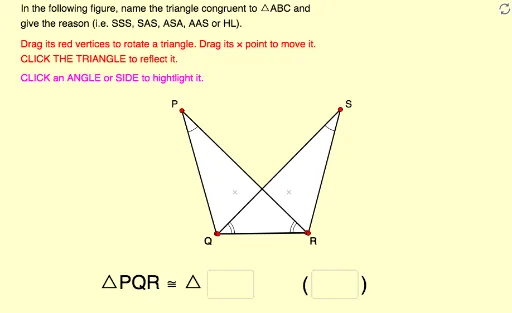
This interactive GeoGebra exercise focuses on naming congruent triangles with justifications. Students can move, rotate, and reflect the given triangles to visually compare corresponding sides and angles. The core mathematical concepts include congruence criteria (SSS, SAS, ASA, etc.) and the correct ordering of vertices in congruence statements. The construction uses commands such as Polygon, Vector, Angle, Intersect, Textfield, Segment, Midpoint, Rotate, and Vertex to create dynamic triangle pairs with input fields for answers. It is suitable for middle or high school geometry classes, providing hands-on practice to reinforce understanding of triangle congruence and logical reasoning.
GeoGebra Commands & Parameters
Polygon(A, B, C) → poly1, c, a, bVector(P, A) → uVector(P, B) → vVector(P, C) → wPolygon(A_1, B_1, C_1) → poly1_1, c_1, a_1, b_1Vector(P_1, A_1) → u_1Vector(P_1, B_1) → v_1Vector(P_1, C_1) → w_1Angle(B, A, C) → αAngle(A, C, B) → βAngle(A_1, C_1, B_1) → γAngle(B_1, A_1, C_1) → δIntersect(Line[X_0, Rotate[Y_0, Ang_A, X_0]], Line[Y_0, Rotate[X_0, (-(180° - Ang_C - Ang_A)), Y_0]]) → Z_0Polygon(X_0, Y_0, Z_0) → poly2, z_0, x_0, y_0Textfield(text13) → Ans1Textfield(text14) → Ans2Segment(D, E) → rMidpoint(Segment[Intersect[Circle[A, r], b], Intersect[Circle[A, r], c]]) → FMidpoint(Segment[Intersect[Circle[C, r], a], Intersect[Circle[C, r], b]]) → GMidpoint(Segment[Intersect[Circle[A_1, r], b_1], Intersect[Circle[A_1, r], c_1]]) → HMidpoint(Segment[Intersect[Circle[C_1, r], a_1], Intersect[Circle[C_1, r], b_1]]) → IAngle(A_1, B_1, C_1) → εAngle(C, B, A) → ζMidpoint(Segment[Intersect[Circle[B, r], a], Intersect[Circle[B, r], c]]) → JMidpoint(Segment[Intersect[Circle[B_1, r], a_1], Intersect[Circle[B_1, r], c_1]]) → KRotate(Polygon[Mirror[X_0, x = 0], Mirror[Y_0, x = 0], Mirror[Z_0, x = 0]], 225°, (2, 0)) → poly3Vertex(poly3, 1) → X_1Vertex(poly3, 2) → Y_1Vertex(poly3, 3) → Z_1
AI Drawing Prompt Reference
Draw two triangles that can be moved and rotated, with one translated from the other using vectors, and show the connecting vectors between corresponding vertices. Construct a third triangle congruent to the first but reflected and rotated, and label the corresponding angles. Add two text input fields for entering congruence reasons. On each side of the triangles, place points and construct midpoints of segments between intersection points to show relationships. The figure is for practicing naming congruent triangles with correct vertex order.
The prompt above was compiled from the original drawing commands and is for reference only.