
Congruence via Rigid Motions
Loading the math board and drawing, please wait…
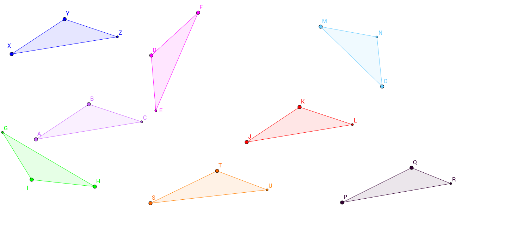
This example demonstrates how geometric figures can be made congruent through rigid motions such as translation, rotation, and reflection. Key math concepts include congruence, rigid transformations, vectors, and geometric constructions. It utilizes commands like Point, Polygon, Intersect, Line, Mirror, Rotate, Vector, and Translate in GeoGebra. Suitable for high school mathematics education to illustrate transformation and congruence criteria.
GeoGebra Commands & Parameters
Point(Circle[A, 3.605551275463989]) → BPolygon(A, B, C_1) → poly1, c, a, bPoint(Circle[X, 3.605551275463989]) → YPolygon(X, Y, F_1) → poly2, f, d, eIntersect(a, b) → CIntersect(d, e) → ZLine(G_1, I_1) → gMirror(A, g) → FMirror(B, g) → DMirror(C_1, g) → J_1Polygon(F, D, J_1) → poly1', j, a', b'Intersect(a', b') → ERotate(A, 140°, K_1) → HRotate(B, 140°, K_1) → IRotate(C_1, 140°, K_1) → L_1Polygon(H, I, L_1) → poly1'_1, l, a'_1, b'_1Intersect(a'_1, b'_1) → GVector(J_2, M_1) → uTranslate(A, u) → JTranslate(B, u) → KTranslate(C_1, u) → N_1Polygon(J, K, N_1) → poly1'_2, n, a'_2, b'_2Intersect(a'_2, b'_2) → LPoint(Circle[P, 4.40953512288994]) → QPolygon(P, Q, Q_1) → poly3, q, o, pPoint(Circle[M, 4.88069667158286]) → OPolygon(M, O, T_1) → poly4, t, r, sPoint(Circle[S, 4.204045670541651]) → TPolygon(S, T, W) → poly5, w, u_1, vIntersect(u_1, v) → UIntersect(o, p) → RIntersect(r, s) → N
AI Drawing Prompt Reference
Draw two congruent triangles and demonstrate how they can be made to coincide through translation, rotation, and reflection. Start by drawing the first triangle, then the second. Find the midpoints of two sides, draw the line through them, and use it to reflect the first triangle. Rotate the first triangle by 140 degrees and then translate it along a vector to show another way they can coincide. Finally, draw two additional triangles and show how their sides intersect.
The prompt above was compiled from the original drawing commands and is for reference only.