
Cones and Cylinders from Revolution
Loading the math board and drawing, please wait…
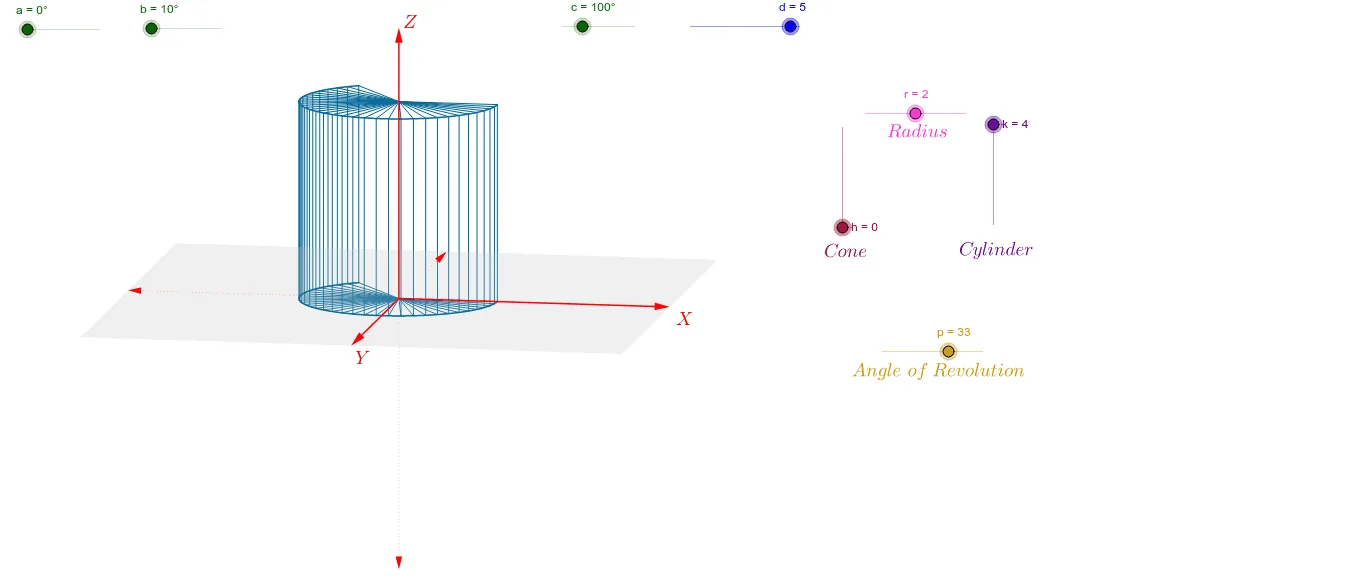
This example demonstrates the creation of 3D solids like cones and cylinders through the revolution of 2D shapes. Key math concepts include solids of revolution, geometric transformations, and parametric curves. It uses GeoGebra commands like Vector, Polygon, Sequence, and CurveCartesian. Suitable for high school and above studying solid geometry and calculus.
GeoGebra Commands & Parameters
Vector(1.1 * d * W_x) → uVector(1.1 * d * W_y) → vVector(1.1 * d * W_z) → wPolygon(1.1 * d * (W_x + W_y), 1.1 * d * (-W_x + W_y), 1.1 * d * (-W_x - W_y), 1.1 * d * (W_x - W_y)) → poly1, g, i, j, lSequence(r * cos(0.125 * i) * W_x + r * sin(0.125 * i) * W_y, i, 0, p) → list1Sequence(r * cos(0.125 * i) * W_x + r * sin(0.125 * i) * W_y + k * W_z, i, 0, p) → list3CurveCartesian(x(r * cos(0.125 * i) * W_x + r * sin(0.125 * i) * W_y), y(r * cos(0.125 * i) * W_x + r * sin(0.125 * i) * W_y), i, 0, p) → e_1CurveCartesian(x(r * cos(0.125 * t) * W_x + r * sin(0.125 * t) * W_y + k * W_z), y(r * cos(0.125 * t) * W_x + r * sin(0.125 * t) * W_y + k * W_z), t, 0, p) → e_2Sequence(Segment[A, Element[list1, i]], i, 1, p + 1) → list2Sequence(Segment[Element[list1, i], Element[list3, i]], i, 1, p + 1) → list4Sequence(Segment[(0, 0) + k * W_z, Element[list3, i]], i, 1, p + 1) → list5
AI Drawing Prompt Reference
Draw a 3D solid of a cone and a cylinder. Start by creating three direction vectors u, v, and w. Then, use these vectors to form a quadrilateral poly1. Next, generate a series of parametric curves e_1 and e_2 to represent the side surfaces of the cone and cylinder. Finally, connect the points on these curves with line segments to form the side surfaces of the cone and cylinder.
The prompt above was compiled from the original drawing commands and is for reference only.