
Cone: Volume and Curved Surface Area Dynamic Demo
Loading the math board and drawing, please wait…
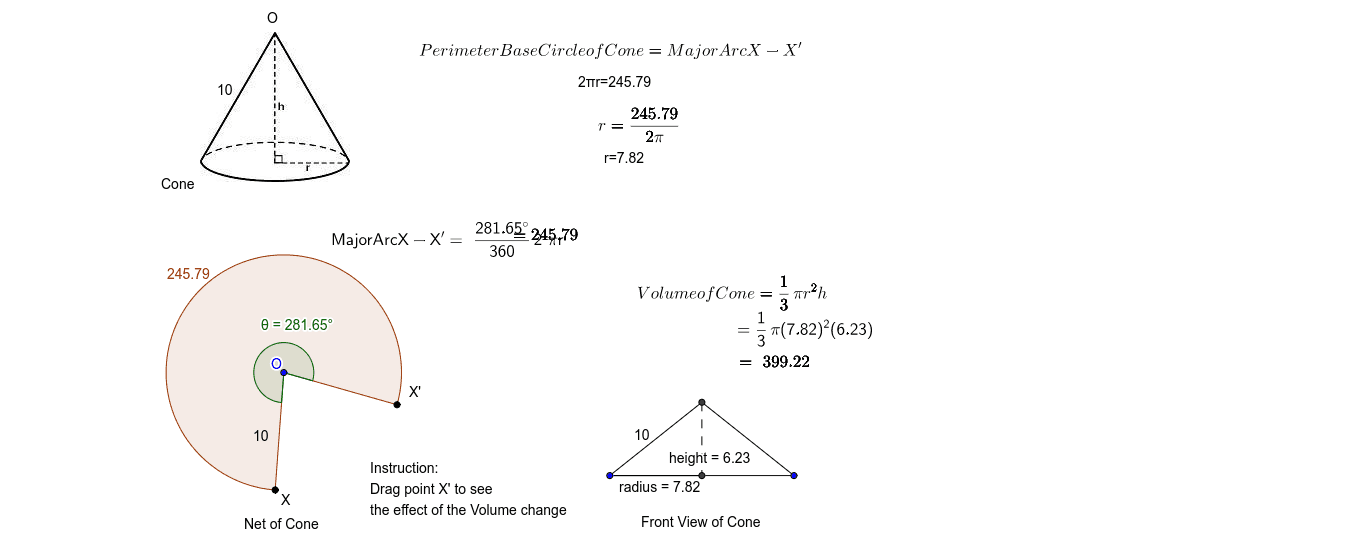
This GeoGebra example dynamically demonstrates the volume and curved surface area of a cone. It visualizes the cone's 3D structure and its net, allowing users to explore the relationships between radius, height, slant height, volume (V=1/3πr²h) and lateral surface area (S=πrl). The construction uses commands such as Circle, Point, Angle, OrthogonalLine, Intersect, CircleArc, Mirror, Segment, CircleSector, and Rotate to build the base circle, apex, height, slant edges, and the unfolded sector. Text objects display formulas and measurements. Suitable for middle and high school geometry classes, math labs, or self-study, this interactive tool enhances spatial reasoning and deepens understanding of cone surface area and volume formulas.
GeoGebra Commands & Parameters
Circle(O, 10) → kPoint(k) → X'Point(k) → XAngle(X', O, X) → θOrthogonalLine(A, xAxis) → aCircle(A, θ / ° / 36) → cOrthogonalLine(A, yAxis) → bCircle(A, 10) → dIntersect(d, b, 1) → BIntersect(d, a, 2) → CCircleArc(A, B, C) → eIntersect(c, b, 1) → DOrthogonalLine(D, b) → fMirror(A, f) → A'Segment(A, A') → gIntersect(e, f) → E,Segment(A, E) → hSegment(E, A') → iSegment(A', A) → jSegment(A, D) → radiusSegment(E, D) → heightCircleSector(O, X', X) → pRotate(X, 45*°, O) → G'
AI Drawing Prompt Reference
Draw a cone to demonstrate its volume and curved surface area. Start by creating the base circle and the apex, then connect the apex to the center of the base to form the height. Next, draw the slant edges from the apex to the base circle, and show the net of the cone as a sector. Label the radius, height, slant height, and the arc length of the sector. Display the volume formula V=1/3πr²h and the lateral surface area formula S=πrl. Use a slider to dynamically adjust the cone's dimensions and observe the changes in the formulas.
The prompt above was compiled from the original drawing commands and is for reference only.