
Cosine Rule Demonstration by teolipseng99
Loading the math board and drawing, please wait…
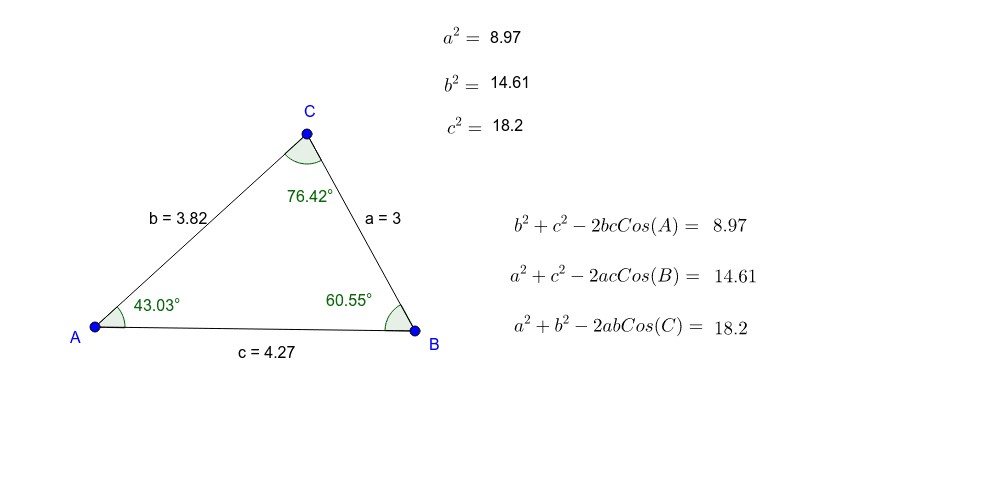
This example dynamically demonstrates the relationship between the lengths of the sides of a triangle and one of its angles, visually illustrating the application of the Cosine Rule. The core mathematical concepts involved are the Cosine Rule, triangle geometry, and angle measurement. The construction uses GeoGebra commands such as Segment (line segment), Angle (angle), Text (text), and LaTeX (formula) to build the triangle and annotations, with objects including points A, B, C, side lengths a, b, c, angle α, and multiple text labels. It is suitable for high school mathematics teaching, helping students understand and memorize the Cosine Rule and exploring its application in solving triangle problems.
GeoGebra Commands & Parameters
Segment(A, B) → cSegment(B, C) → aSegment(C, A) → bAngle(B, A, C) → A_2Angle(C, B, A) → B_2Angle(A, C, B) → αText(a^(2)) → text1Text(b^(2)) → text2Text(c^(2)) → text3LaTeX("b^2=") → text5LaTeX("c^2=") → text6
AI Drawing Prompt Reference
Draw an arbitrary triangle with three vertices and three sides. Label the three side lengths as squared values (a², b², c²) near their respective sides. Mark all three interior angles, with one angle designated as alpha (α). Add text annotations showing the formulas "b²=" and "c²=" in the figure to illustrate the relationship between side lengths and angles according to the cosine rule. Keep the layout clear for educational demonstration.
The prompt above was compiled from the original drawing commands and is for reference only.