
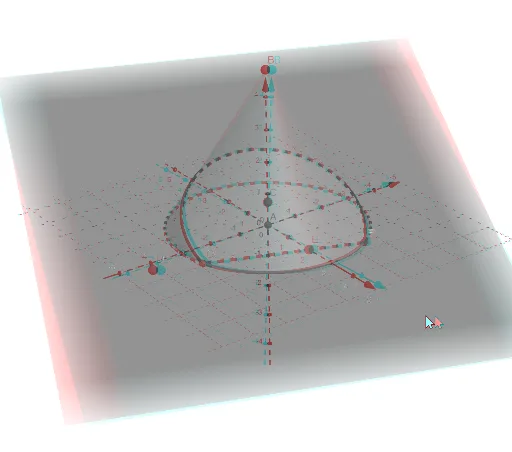
Cone intersected by plane forming a parabola
Loading the math board and drawing, please wait…
This example demonstrates the intersection of a cone with a plane resulting in a parabolic curve. Key math concepts include cones, parabolas, coordinate geometry, linear functions, and intersection calculations. It is constructed using GeoGebra commands such as Intersect, Point, Cone, Plane, IntersectPath, and Corner. Suitable for high school students and math enthusiasts studying spatial geometry and analytical geometry, it can be used for teaching demonstrations or geometric exploration.
GeoGebra Commands & Parameters
Intersect(yAxis, zAxis) → APoint(zAxis) → BCone(A, B, 3) → a, c, bPoint(zAxis) → CPoint(xAxis) → EPlane(C, D, E) → pIntersectPath(p, a) → dCorner(d) → F, G
AI Drawing Prompt Reference
Draw a 3D coordinate system with a cone whose axis is the vertical axis. The cone has its apex at a point on the vertical axis and its base center at a lower point on the same axis, with base radius 3. Choose another point on the vertical axis and a point on the horizontal axis; together with a third implicit point, define a plane that cuts obliquely through the cone. The intersection of this plane with the cone's lateral surface forms a parabolic curve, which appears as a smooth line on the cone, with its two endpoints on the base edge. Show the overall solid geometry of the cone-plane intersection, emphasizing the parabolic shape.
The prompt above was compiled from the original drawing commands and is for reference only.