
Cone and Cylinder
Loading the math board and drawing, please wait…
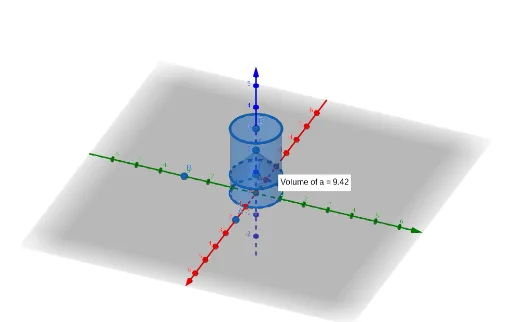
This example demonstrates the geometric relationship between a cone and a cylinder. Key mathematical concepts include volume calculation in solid geometry and secant lines. Using GeoGebra commands such as Point, Intersect, Cylinder, and Volume, the construction process of a cone and a cylinder can be dynamically shown. Suitable for high school and above students or teachers for teaching and learning.
GeoGebra Commands & Parameters
Point(xAxis) → APoint(yAxis) → BIntersect(yAxis, xAxis) → CPoint(zAxis) → DCylinder(C, D, 1) → a, c, d, bVolume(a) → volumeaPointIn(b) → PointbPoint(zAxis) → EPoint(zAxis) → FCone(E, F, 1) → e, f, g
AI Drawing Prompt Reference
In a 3D coordinate system, draw the coordinate axes and place points on the x-axis, y-axis, and z-axis. Use the intersection of the y-axis and x-axis as the center of the base. Construct a cylinder with radius 1 extending along the z-axis from this center, and compute its volume. Pick a random point inside the cylinder. Then choose two more points on the z-axis, using one as the apex and the other as the base center, to construct a cone with radius 1. The scene shows both solids together, highlighting their spatial relationship and volume comparison.
The prompt above was compiled from the original drawing commands and is for reference only.