
Conditions for Parallelogram - 2 (Dynamic Geometry)
Loading the math board and drawing, please wait…
In collections
Quadrilaterals الرُباعيات
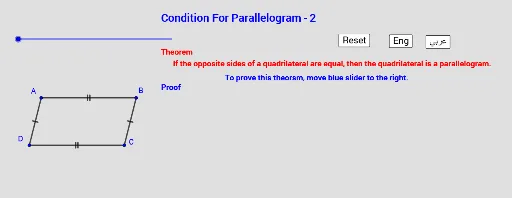
① This interactive GeoGebra example demonstrates various sufficient conditions for a quadrilateral to be a parallelogram, such as both pairs of opposite sides being parallel, one pair of opposite sides being parallel and equal, or diagonals bisecting each other. ② The core mathematical concepts are the parallelogram determination theorems in plane geometry, involving properties of parallel sides, equal sides, equal angles, and diagonal bisection. ③ Construction highlights: Based on the construction summary, the example uses GeoGebra commands including Segment, Intersect, Polygon, and Angle, with objects A, B, C, D, E, and multiple text labels (text1 to text14) plus a button (button1) to switch between different condition cases; sliders (t1 to t4) may allow dynamic adjustment of the figure. ④ This resource is suitable for middle or high school geometry classes, useful for classroom demonstrations, student exploration of parallelogram conditions, or as a template for teachers creating dynamic worksheets and for students conducting mathematical experiments.
GeoGebra Commands & Parameters
Segment(A, B) → fSegment(C, D) → gSegment(D, A) → hSegment(C, B) → iSegment(D, B) → jSegment(A, C) → kIntersect(k, j) → EPolygon(A, B, C) → t1, c, a, bPolygon(A, C, D) → t2, d, a_1, c_1Polygon(A, B, D) → t3, d_1, a_2, b_1Polygon(D, B, C) → t4, c_2, d_2, b_2Angle(C, A, B) → αAngle(A, C, D) → βAngle(D, B, C) → γAngle(B, D, A) → δ
AI Drawing Prompt Reference
Draw quadrilateral ABCD, connect diagonals AC and BD to mark their intersection point E. Then draw triangles ABC, ACD, ABD, and BCD. Adjust sliders t1 to t4 to change the shape of quadrilateral ABCD and observe under which conditions ABCD becomes a parallelogram.
The prompt above was compiled from the original drawing commands and is for reference only.