
Concave and Convex Mirror Reflection and Image Formation Simulation
Loading the math board and drawing, please wait…
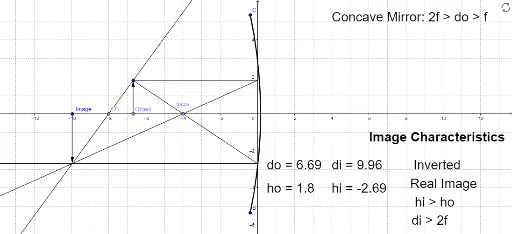
This GeoGebra example simulates image formation by concave and convex mirrors, demonstrating how light rays reflect off curved surfaces and how the position, size, and orientation of the resulting real or virtual image change with object distance and mirror curvature. Core mathematical concepts include the law of reflection, the spherical mirror equation (1/f = 1/u + 1/v), focal point and focal length, real versus virtual images, and geometric ray tracing. The construction uses GeoGebra commands such as Point, CircleArc, Vector, Segment, Ray, Rotate, and Mirror to build the mirror arc, incident rays, normals, reflected rays, and image points. Interactive sliders or draggable objects allow users to adjust object distance and curvature, observing the dynamic image changes. This resource is suitable for middle or high school physics and geometry classes studying optics, and for interdisciplinary STEM activities that combine geometric construction with physical principles.
GeoGebra Commands & Parameters
Point(xAxis) → focusCircleArc(A, B, C) → cVector(Object, D) → uSegment(D, F) → aRay(F, focus) → bSegment(D, G) → dVector(Image, I) → vRay(G, I) → eSegment(D, J) → fRay(D, I) → gRay(G, I) → hRay(J, I) → iRay(F, I) → jRay(D, CC) → kRay(J, D) → mRotate(focus, 180°, F) → focus'Mirror(I, yAxis) → I'Ray(F, focus') → lRay(G, I') → n
AI Drawing Prompt Reference
Create a simulation of image formation by concave and convex mirrors, showing how light rays reflect off curved surfaces and how the position, size, and orientation of images change with object distance and mirror curvature. Include focal points, mirror arcs, incident rays, normals, reflected rays, and image points, with interactive elements to adjust object distance and curvature for dynamic image observation.
The prompt above was compiled from the original drawing commands and is for reference only.