
Complex Variable Function Mapping Diagrams and Solving Real Cubic Equations
Loading the math board and drawing, please wait…
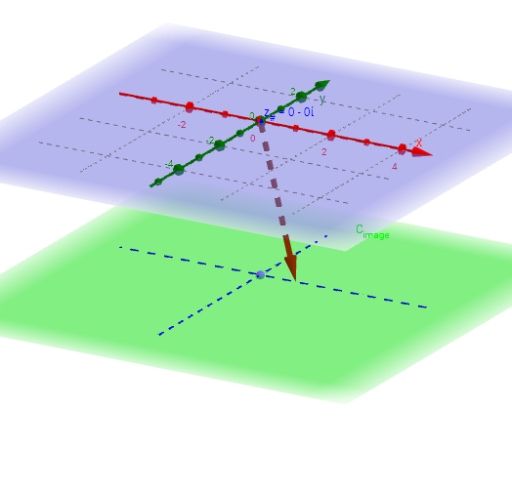
This example demonstrates complex variable function mapping diagrams and the process of solving real cubic equations. Key math concepts include complex functions, mappings, cubic equations, complex roots, and loci. GeoGebra commands/objects used in construction are ComplexRoot, Sequence, Zip, Vector, CurveCartesian, PointIn, Intersect, Circle, Center, Point, Locus, and Radius. Suitable for high school and above students to understand complex function properties and cubic equation solutions.
GeoGebra Commands & Parameters
ComplexRoot(f) → r_1, r_2, r_3Sequence((δ * (cos(t) + (sin(t) * ί))) + real(z_#) + (imaginary(z_#) * ί), t, -3.14159, π, (2 * π / m)) → z_*Zip(f_C[z, p, q], z, z_*) → fz_*f_C(z_#, p, q) → f_{(z#)}Sequence((x(Element[fz_*, k]), y(Element[fz_*, k]), height_{image}), k, 1, m) → fpoint_*Vector(z_#, f_{(z#).}) → wCurveCartesian(t, 0, height_{image}, t, -5, 5) → XhCurveCartesian(0, t, height_{image}, t, -5, 5) → YhPointIn(C_{image}) → LSequence(Vector[Element[z_*, j], Element[fpoint_*, j]], j, 1, m) → fvec_*Intersect(f, xAxis) → A, B, CZip(Vector[(x(z), y(z), 0), (0, 0, height_{image})], z, roots) → rootsvecCircle(r_3, r_2, r_1) → cCenter(c) → O_rPoint(circle) → P_CLocus(F_D, P_C) → f_{circ}Radius(c) → δ_r
AI Drawing Prompt Reference
Create a diagram illustrating complex variable function mappings and solving real cubic equations, showing the mapping relationships of complex functions and the roots of cubic equations. Include complex roots, mapped points, vectors, and curves, with the roots' locus. First plot the complex roots and mapped points, then connect these points to form mapping lines, and finally display the roots' locus and mapping curves.
The prompt above was compiled from the original drawing commands and is for reference only.