
Complex Number Multiplication Demo by Cliff Packman
Loading the math board and drawing, please wait…
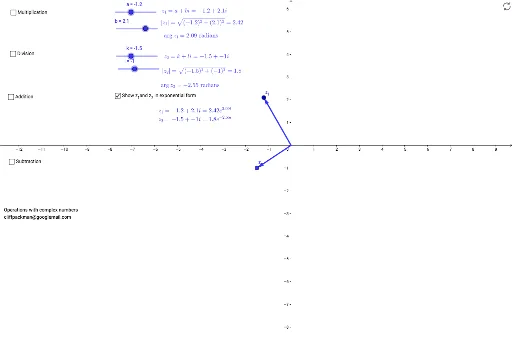
This example demonstrates the geometric interpretation of multiplying complex numbers, showing how the product of two complex numbers corresponds to the rotation of their vectors and the multiplication of their moduli. It involves core concepts like the geometric representation of complex numbers, modulus, argument, and vector rotation. Constructed using GeoGebra commands such as If and Vector to create complex vectors a, b, compute the product z_1, display its argument argumentz_1 and modulus modulusz_1, and utilize Slider animations to illustrate parameter changes. Suitable for high school mathematics education to understand the algebraic operations and geometric intuition of complex number multiplication.
GeoGebra Commands & Parameters
If(a < 0, π - e, e) → fIf(b < 0, (-f), f) → argumentz_1If(k < 0, π - j, j) → mIf(l < 0, (-m), m) → argumentz_2If(x(z_3) < 0, π - o, o) → pIf(y(z_3) < 0, (-p), p) → qVector(A, z_1) → uVector(A, z_2) → vVector(A, z_3) → wIf(x(z_4) < 0, π - r, r) → sIf(y(z_4) < 0, (-s), s) → argumentz_4Vector(A, z_4) → zVector(z_1, z_5) → u_1Vector(z_2, z_5) → v_1Vector(A, z_5) → w_1If(x(z_5) < 0, π - absz_5, absz_5) → absz_52If(y(z_5) < 0, (-absz_52), absz_52) → argumentz_5Vector(z_1, z_6) → c_1Vector(A, z_6) → d_1
AI Drawing Prompt Reference
Draw a geometric interpretation of complex number multiplication, showing how the product of two complex numbers corresponds to the rotation of their vectors and the multiplication of their moduli. First, draw two complex number vectors, then calculate their product and display the modulus and argument of the product. Use slider animations to illustrate parameter changes and draw vectors related to the product to help understand the algebraic operations and geometric intuition of complex number multiplication.
The prompt above was compiled from the original drawing commands and is for reference only.