
Complex Integration and Domain Coloring
Loading the math board and drawing, please wait…
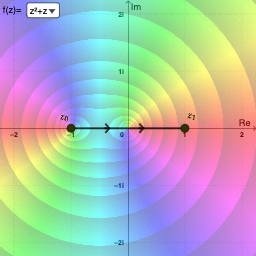
This example demonstrates complex integration and domain coloring visualization. It involves core mathematical concepts like complex numbers, derivatives, integrals, and analytical geometry. GeoGebra commands and objects such as SelectedIndex, Midpoint, Distance, Element, Segment, and Derivative are used in its construction. Suitable for high school and above students to understand the properties and visual representation of complex function integration.
GeoGebra Commands & Parameters
SelectedIndex(pathNames) → pathIndexMidpoint(A, B) → MDistance(A, B) → distABElement(pathList, pathIndex) → pathSegment(path(0.3), path(0.3 + 0.01)) → arrow1Segment(path(0.6), path(0.6 + 0.01)) → arrow2Element(X, pathIndex) → ReztElement(Y, pathIndex) → ImztDerivative(Rezt, t) → dReztDerivative(Imzt, t) → dImztSelectedIndex(plotNames) → plotIndexSelectedIndex(funcNames) → funcIndex
AI Drawing Prompt Reference
Draw a graphic showing complex integration and domain coloring. The graphic includes concepts of complex numbers, derivatives, integrals, and analytical geometry. Key objects are paths, arrows, real and imaginary parts, and their derivatives. The construction order is to define paths first, then add arrows, then extract real and imaginary parts, and finally compute derivatives and visualize them.
The prompt above was compiled from the original drawing commands and is for reference only.