
Complex Addition Visualized: Vector Translation and Parallelogram Rule
Loading the math board and drawing, please wait…
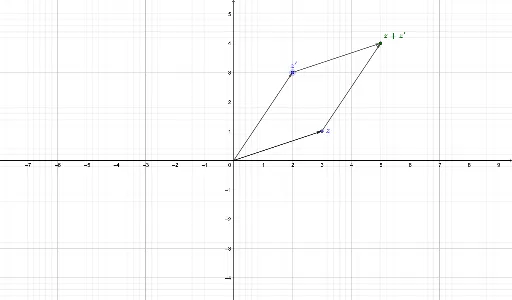
① This GeoGebra example dynamically demonstrates the addition of two complex numbers by representing them as vectors in the complex plane, using vector translation and the parallelogram rule to visualize the geometric meaning of complex addition. ② The core mathematical concepts include the geometric representation of complex numbers, vector addition, the parallelogram law, and coordinate transformations in the Argand diagram. ③ Construction highlights: The example employs GeoGebra commands such as Intersect to find intersection points, Vector to create vectors u and v, and Translate to translate vector u to the endpoint of v, producing u' and thereby constructing a parallelogram. Objects like A, B, C, B', w, and a are used to define points and vectors. ④ This resource is suitable for high school or early college students learning complex numbers and vectors, and serves as an effective classroom demonstration tool for teachers to bridge algebraic operations with geometric intuition.
GeoGebra Commands & Parameters
Intersect(xAxis, yAxis) → CVector(C, A) → uVector(C, B) → vTranslate(u, v) → u'Translate(B, u') → B'Vector(B, B') → wVector(A, B') → a
AI Drawing Prompt Reference
Draw two vectors starting from the origin in the complex plane, representing two complex numbers. Construct a parallelogram using these vectors as adjacent sides. Translate one vector to the endpoint of the other, forming a translated vector. Connect the origin to the translated endpoint to get the sum vector. Mark the endpoints of the original vectors, the translated endpoint, and the origin. Draw the diagonal of the parallelogram to clearly illustrate vector addition and the parallelogram rule.
The prompt above was compiled from the original drawing commands and is for reference only.