
Complementary Angles Demonstration
Loading the math board and drawing, please wait…
In collections
Explore Angles Relationships
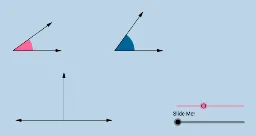
This GeoGebra applet dynamically illustrates the concept of complementary angles without using angle measures. It helps students understand what it means for two angles to be complementary. Using commands like Circle, Segment, Point, etc., the applet constructs complementary angles. Suitable for middle school and above students learning geometry.
GeoGebra Commands & Parameters
Circle(A, B) → cSegment(A, B) → aPoint(b) → CRay(A, C) → dPoint(d) → DCircle(D, a) → eMidpoint(A, D) → EOrthogonalLine(E, b) → fPoint(f) → FRay(E, F) → gPoint(g) → GIntersect(c, b) → H, IIntersect(e, b) → J, KRotate(I, α, A) → I'Angle(I, A, I') → βRotate(K, π / 2 - β, D) → K'Angle(K, D, K') → γCircle(A, (0.4 * a)) → hCircle(D, (0.4 * a)) → kSegment(A, I') → iSegment(D, K') → jIntersect(h, b, 2) → LIntersect(h, i, 1) → MIntersect(k, b, 2) → NIntersect(k, j, 1) → OCircle(G, a) → pIntersect(p, l, 2) → PIntersect(p, l, 1) → QIntersect(p, g, 1) → RVector(G, P) → uVector(G, R) → vCircleSector(A, L, M) → qCircleSector(D, N, O) → rDilate(A, If[0 < m ≤ 1, 1 - m, 0], G) → A'Vector(A, A') → wTranslate(q, w) → q'Rotate(q', If[1 < m ≤ 2, ((m - 1) * (π / 2 - α)), π / 2 - α], G) → q''Dilate(D, If[2 < m ≤ 3, 3 - m, 0], G) → D'Vector(D, D') → nTranslate(r, n) → r'Vector(G, Q) → sAngle(R, G, Q) → δVector(A, I') → u_1Vector(A, I) → tVector(D, K) → v_1Vector(D, K') → w_1
AI Drawing Prompt Reference
Draw two complementary angles where the sum of angle I and angle I' is 90 degrees, and the sum of angle K and angle K' is also 90 degrees. Start by drawing a circle and a line segment, then construct the complementary angles. Next, draw two circles and two line segments, and use rotation and reflection to construct the complementary angles. Finally, use translation and rotation to adjust the angles to ensure they are complementary.
The prompt above was compiled from the original drawing commands and is for reference only.