
Complementary and Supplementary Angles Demo
Loading the math board and drawing, please wait…
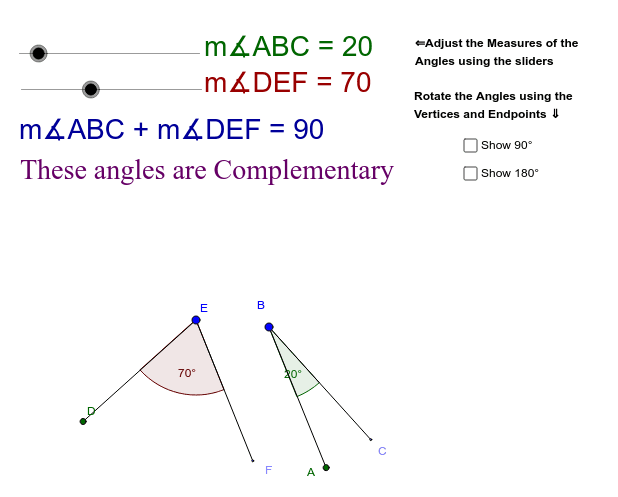
This example demonstrates the relationships between complementary and supplementary angles through interactive manipulation. Key math concepts include angle measurement, complementary angles (sum to 90°), and supplementary angles (sum to 180°). Construction involves GeoGebra commands like Circle, Point, Rotate, Angle, and Segment to build angle models. Suitable for middle school and above students learning angle relationships and geometric constructions.
GeoGebra Commands & Parameters
Circle(I, 4) → qCircle(K, 4) → pCircle(B, 4) → cPoint(c) → ARotate(A, MeasureABC°, B) → CAngle(A, B, C) → αSegment(B, A) → aSegment(B, C) → bCircle(E, 4) → dPoint(d) → DRotate(D, MeasureDEF°, E) → FAngle(D, E, F) → βSegment(D, E) → eSegment(F, E) → fPoint(q) → HRotate(H, 90*°, I) → H'Angle(H, I, H') → γSegment(I, H') → iSegment(I, H) → jPoint(p) → JRotate(J, 180*°, K) → J'Angle(J, K, J') → δSegment(J', K) → kSegment(J, K) → l
AI Drawing Prompt Reference
Draw two circles with centers at two points and radius 4. Take a point on the first circle, connect it to the center to form a segment. Rotate this point around the center by a certain angle to get another point, connect the two points to form a segment and create an angle. Repeat this process on the second circle to get another angle. Draw another circle with center at one of the points and radius 4, take a point on the circle, connect it to the center to form a segment. Rotate this point around the center by 90 degrees to get another point, connect the two points to form a segment and create an angle. Finally, draw a circle with center at the other point, take a point on the circle, connect it to the center to form a segment. Rotate this point around the center by 180 degrees to get another point, connect the two points to form a segment and create an angle. Show the relationships between these angles, such as complementary and supplementary angles.
The prompt above was compiled from the original drawing commands and is for reference only.