
Comparing Rational Numbers – Fractions on the Number Line
Loading the math board and drawing, please wait…
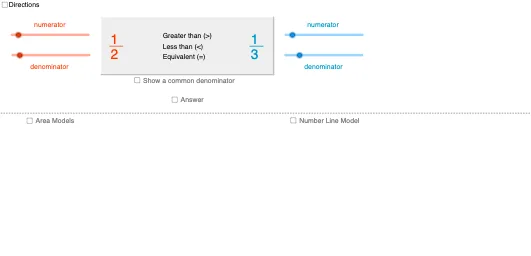
This GeoGebra example demonstrates how to compare rational numbers, particularly fractions, by locating them on a number line and visually judging their relative sizes. Core mathematical concepts include rational numbers, fractions, common denominators, inequality relationships (greater than, less than, equal to), and one-dimensional coordinate representation. The construction relies on GeoGebra commands such as Min, Max, If, Segment, Polygon, Text, and Point, together with objects including Point, Segment, Polygon, Text, and number-line fraction objects NumLnFrac1 and NumLnFrac2 to build fraction markers and a relationship choice interface. It is suitable for middle school rational-number instruction and upper-elementary fraction lessons, supporting classroom demonstration and student-led inquiry into ordering rational numbers.
GeoGebra Commands & Parameters
Min(c_1, d) → cMax(Sequence[If[Mod[c, i] + Mod[d, i] ≟ 0, i, -1], i, 1, Min[{c, d}]]) → factor_2If(factor_2 > 0, factor_2, 1) → factor_4Min(a_1, b) → aMax(Sequence[If[Mod[a, i] + Mod[b, i] ≟ 0, i, -1], i, 1, Min[{a, b}]]) → factor_1If(factor_1 > 0, factor_1, b) → factor_3Max(Sequence[If[Mod[l, i] + Mod[n, i] ≟ 0, i, -1], i, 1, Min[{l, n}]]) → factorSegment(C, D) → eSegment((x(C) + (1 / 8 * (x(D) - x(C))), y(C) + 0.1), (x(C) + (1 / 8 * (x(D) - x(C))), y(C) - 0.1)) → gSegment((x(C) + (0 / 8 * (x(D) - x(C))), y(C) + 0.2), (x(C) + (0 / 8 * (x(D) - x(C))), y(C) - 0.2)) → fSegment((x(C) + (2 / 8 * (x(D) - x(C))), y(C) + 0.2), (x(C) + (2 / 8 * (x(D) - x(C))), y(C) - 0.2)) → hSegment((x(C) + (3 / 8 * (x(D) - x(C))), y(C) + 0.1), (x(C) + (3 / 8 * (x(D) - x(C))), y(C) - 0.1)) → iSegment((x(C) + (4 / 8 * (x(D) - x(C))), y(C) + 0.2), (x(C) + (4 / 8 * (x(D) - x(C))), y(C) - 0.2)) → jSegment((x(C) + (5 / 8 * (x(D) - x(C))), y(C) + 0.1), (x(C) + (5 / 8 * (x(D) - x(C))), y(C) - 0.1)) → pSegment((x(C) + (6 / 8 * (x(D) - x(C))), y(C) + 0.2), (x(C) + (6 / 8 * (x(D) - x(C))), y(C) - 0.2)) → qSegment((x(C) + (7 / 8 * (x(D) - x(C))), y(C) + 0.1), (x(C) + (7 / 8 * (x(D) - x(C))), y(C) - 0.1)) → rSegment((x(C) + (8 / 8 * (x(D) - x(C))), y(C) + 0.2), (x(C) + (8 / 8 * (x(D) - x(C))), y(C) - 0.2)) → sPolygon(G, H, I, J) → poly1, g_1, h_1, i_1, j_1Segment(H, I) → tSegment(G, H) → b_1Segment(I, J) → d_1Segment(J, G) → e_1Polygon(G, (x(G) + (a / b * (x(H) - x(G))), y(G)), (x(J) + (a / b * (x(H) - x(G))), y(J)), J) → poly2, g_2, f_1, k_1, j_2Segment((x(G) + (1 / b * (x(H) - x(G))), y(G)), (x(G) + (1 / b * (x(H) - x(G))), y(G) - 1)) → l_1Segment((x(G) + (2 / b * (x(H) - x(G))), y(G)), (x(G) + (2 / b * (x(H) - x(G))), y(G) - 1)) → m_1Segment((x(G) + (3 / b * (x(H) - x(G))), y(G)), (x(G) + (3 / b * (x(H) - x(G))), y(G) - 1)) → n_1Segment((x(G) + (4 / b * (x(H) - x(G))), y(G)), (x(G) + (4 / b * (x(H) - x(G))), y(G) - 1)) → p_1Segment((x(G) + (5 / b * (x(H) - x(G))), y(G)), (x(G) + (5 / b * (x(H) - x(G))), y(G) - 1)) → q_1Segment((x(G) + (6 / b * (x(H) - x(G))), y(G)), (x(G) + (6 / b * (x(H) - x(G))), y(G) - 1)) → r_1Segment((x(G) + (7 / b * (x(H) - x(G))), y(G)), (x(G) + (7 / b * (x(H) - x(G))), y(G) - 1)) → s_1Segment((x(G) + (8 / b * (x(H) - x(G))), y(G)), (x(G) + (8 / b * (x(H) - x(G))), y(G) - 1)) → t_1Segment((x(G) + (9 / b * (x(H) - x(G))), y(G)), (x(G) + (9 / b * (x(H) - x(G))), y(G) - 1)) → a_2Segment((x(G) + (10 / b * (x(H) - x(G))), y(G)), (x(G) + (10 / b * (x(H) - x(G))), y(G) - 1)) → b_2Segment((x(G) + (11 / b * (x(H) - x(G))), y(G)), (x(G) + (11 / b * (x(H) - x(G))), y(G) - 1)) → c_2Polygon(K, L, M, N) → poly3, k_2, l_2, m_2, n_2Polygon(K, (x(K) + (c / d * (x(L) - x(K))), y(K)), (x(K) + (c / d * (x(L) - x(K))), y(M)), N) → poly4, k_3, d_2, e_2, n_3Segment((x(K) + (1 / d * (x(L) - x(K))), y(K)), (x(K) + (1 / d * (x(L) - x(K))), y(K) - 1)) → f_2Segment((x(K) + (2 / d * (x(L) - x(K))), y(K)), (x(K) + (2 / d * (x(L) - x(K))), y(K) - 1)) → h_2Segment((x(K) + (3 / d * (x(L) - x(K))), y(K)), (x(K) + (3 / d * (x(L) - x(K))), y(K) - 1)) → i_2Segment((x(K) + (4 / d * (x(L) - x(K))), y(K)), (x(K) + (4 / d * (x(L) - x(K))), y(K) - 1)) → p_2Segment((x(K) + (5 / d * (x(L) - x(K))), y(K)), (x(K) + (5 / d * (x(L) - x(K))), y(K) - 1)) → q_2Segment((x(K) + (6 / d * (x(L) - x(K))), y(K)), (x(K) + (6 / d * (x(L) - x(K))), y(K) - 1)) → r_2Segment((x(K) + (7 / d * (x(L) - x(K))), y(K)), (x(K) + (7 / d * (x(L) - x(K))), y(K) - 1)) → s_2Segment((x(K) + (8 / d * (x(L) - x(K))), y(K)), (x(K) + (8 / d * (x(L) - x(K))), y(K) - 1)) → t_2Segment((x(K) + (9 / d * (x(L) - x(K))), y(K)), (x(K) + (9 / d * (x(L) - x(K))), y(K) - 1)) → a_3Segment((x(K) + (10 / d * (x(L) - x(K))), y(K)), (x(K) + (10 / d * (x(L) - x(K))), y(K) - 1)) → b_3Segment((x(K) + (11 / d * (x(L) - x(K))), y(K)), (x(K) + (11 / d * (x(L) - x(K))), y(K) - 1)) → c_3Polygon(BoxPt, BoxPt + (9, 0), BoxPt + (9, If[ans ∧ words, -4, -3]), BoxPt + (0, If[ans ∧ words, -4, -3])) → box, d_3, e_3, f_3, g_3If(c > 9 ∨ d > 9, "_______", "____") → frac2VinculumIf(a > 9 ∨ b > 9, "_______", "____") → frac1VinculumText(If[a / b > c / d, ">", If[a / b < c / d, "<", "="]]) → relationshipSymbolText(common_1) → equivFrac1NumText(common_2) → equivFrac2NumText(common_3) → equivFrac1DenomText(common_3) → equivFrac2DenomSegment(BoxPt + (0.25, -2.5), BoxPt + (8.75, -2.5)) → relationshipWordsDividerPolygon(Corner[equivFrac1Denom, 1] + (-0.1, 0.1), Corner[equivFrac1Denom, 2] + (0.1, 0.1), (x(Corner[equivFrac1Denom, 2]) + 0.1, y(Corner[equivFrac1Num, 3])), (x(Corner[equivFrac1Denom, 1]) - 0.1, y(Corner[equivFrac1Num, 4]))) → equivFrac1Box, h_3, i_3, j_3, l_3Polygon(Corner[equivFrac2Denom, 1] + (-0.1, 0.1), Corner[equivFrac2Denom, 2] + (0.1, 0.1), (x(Corner[equivFrac2Denom, 2]) + 0.1, y(Corner[equivFrac2Num, 3])), (x(Corner[equivFrac2Denom, 1]) - 0.1, y(Corner[equivFrac2Num, 4]))) → equivFrac2Box, m_3, p_3, q_3, r_3Text(If[common_1 > 99 ∨ common_3 > 99, "__________", If[common_1 > 9 ∨ common_3 > 9, "_______", "____"]]) → equivFrac1VinculumText(If[common_2 > 99 ∨ common_3 > 99, "__________", If[common_2 > 9 ∨ common_3 > 9, "_______", "____"]]) → equivFrac2VinculumText("or") → equivFrac1OrText("or") → equivFrac2OrSegment(Midpoint[G, N], Midpoint[H, M]) → areaModelDragLimitPoint(areaModelDragLimit) → areaModelDragPtSegment((x(areaModelDragPt), y(N)), (x(areaModelDragPt), y(G))) → areaModelDragLine
AI Drawing Prompt Reference
Draw a number line with fraction markers. Place two fraction points on the line to visually compare their sizes. Clearly label the fractions and use arrows or text to indicate greater than, less than, or equal relationships. Construct the number line first, then add fraction points, and finally add comparison notes.
The prompt above was compiled from the original drawing commands and is for reference only.