
Comparing Lines' Gradients
Loading the math board and drawing, please wait…
In collections
Mathematics Form 2
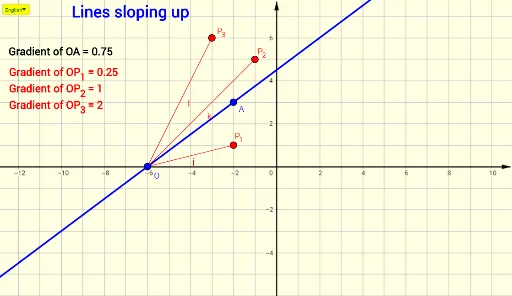
This example demonstrates how to compare the gradients of different lines. The core math concepts involved include slope, coordinate geometry, and function graphing. Key GeoGebra commands used in construction are If, DynamicCoordinates, Line, Slope, Segment, SelectedIndex, etc., for creating and manipulating points, lines, and text objects. Suitable for high school students learning coordinate geometry and functions.
GeoGebra Commands & Parameters
If(y(B) > y(O), 1, y(B) ≟ y(O), 0, -1) → rIf(Distance[B, Q_1] < 0.1, Q_1, Distance[B, Q_2] < 0.1, Q_2, Distance[B, Q_3] < 0.1, Q_3, B) → DIf(Distance[B, P_1] < 0.1, P_1, Distance[B, P_2] < 0.1, P_2, Distance[B, P_3] < 0.1, P_3, B) → CDynamicCoordinates(B, If[r ≟ 1, x(C), x(D)], If[r ≟ 1, y(C), y(D)]) → ALine(O, A) → fSlope(f) → aLine(O, P_1) → gLine(O, P_2) → hLine(O, P_3) → iSlope(g) → OP01Slope(h) → OP02Slope(i) → OP03Segment(O, P_1) → jSegment(O, P_2) → kSegment(O, P_3) → lSelectedIndex(Bahasa) → nIf(n ≟ 1, If[r ≟ 1, "Lines sloping up", r ≟ -1, "Lines sloping down"], If[r ≟ 1, "Garis condong ke atas", r ≟ -1, "Garis condong ke bawah"]) → Text2If(n ≟ 1, "Gradient of OA = " + (Text[a]), "Kecerunan OA = " + (Text[a])) → Text1If(n ≟ 1, "Gradient of ", "Kecerunan ") → Tex1Line(O, Q_1) → mLine(O, Q_2) → sLine(O, Q_3) → tSlope(m) → OQ01Slope(s) → OQ02Slope(t) → OQ03Segment(O, Q_1) → bSegment(O, Q_2) → cSegment(O, Q_3) → d