
Comparing Fractions Template
Loading the math board and drawing, please wait…
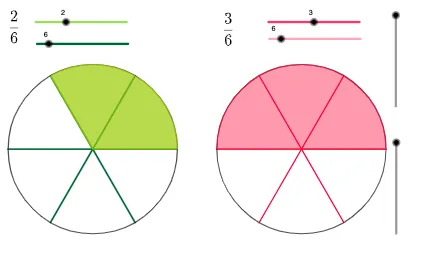
This example demonstrates how to compare fractions using GeoGebra. Key mathematical concepts include fraction comparison. Construction highlights the use of Point, Sequence, Rotate, Circle, CircleSector, Vector, Translate, etc. Suitable for upper elementary or middle school students.
GeoGebra Commands & Parameters
Point(xAxis) → ASequence(Rotate[A, ((i * 360) * ° / k)], i, 1, k) → lista_1Sequence(Segment[Element[lista_1, i], (0, 0)], i, 1, k) → lista_2Rotate(A, ((t * 360) * ° / k)) → A'Circle((0, 0), A) → cCircleSector((0, 0), A, A') → dSequence(Rotate[A, ((i * 360) * ° / k_2)], i, 1, k_2) → lista_4Sequence(Segment[Element[lista_4, i], (0, 0)], i, 1, k_2) → lista_3Rotate(A, ((t_2 * 360) * ° / k_2)) → A'_1CircleSector((0, 0), A, A'_1) → gPoint(xAxis) → BPoint(xAxis) → CVector(B, C) → uTranslate(lista_3, Vector[(s * u)]) → lista_5Translate(c, u) → c'Translate(g, Vector[(s_1 * u)]) → g'Circle((0, 0), A') → hCircleSector(Translate[(0, 0), Vector[(s_1 * u)]], Translate[A, Vector[(s_1 * u)]], Translate[A'_1, Vector[(s_1 * u)]]) → pCircle(Translate[(0, 0), Vector[(s_1 * u)]], Translate[A'_1, Vector[(s_1 * u)]]) → q
AI Drawing Prompt Reference
Draw a coordinate system and create points A, B, and C on the x-axis. Rotate point A around the origin O to generate a sequence of arcs and segments, and compare the sizes of these arcs. Use translation to move these arcs and segments along vector u, creating new arcs and segments to compare different sizes of arcs.
The prompt above was compiled from the original drawing commands and is for reference only.