
Combination of Two Reflections
Loading the math board and drawing, please wait…
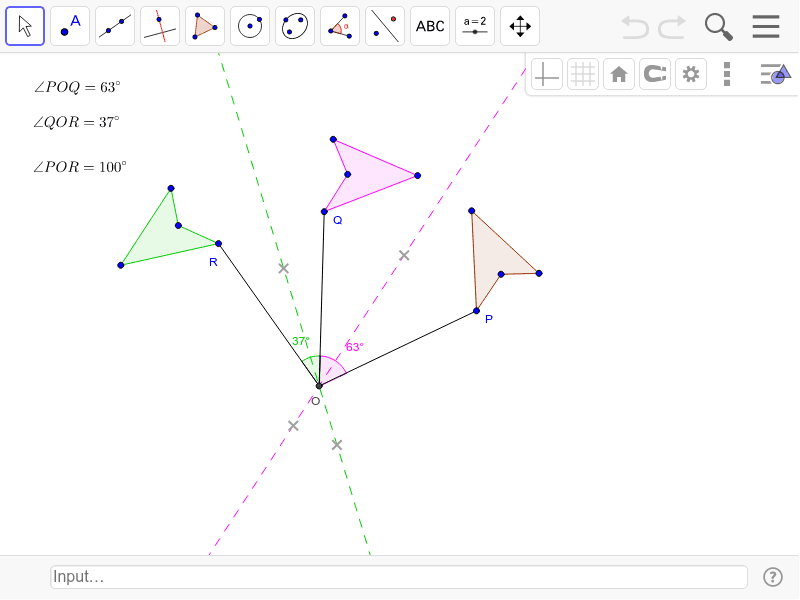
This example demonstrates the geometric transformation effect of combining two reflections. It involves core mathematical concepts such as reflection transformation, symmetry, angle, and polygon construction. The construction utilizes GeoGebra commands and objects like Polygon, Line, Mirror, Intersect, Segment, and Angle as detailed in the summary. It is suitable for high school mathematics teaching to understand transformation combinations and geometric properties.
GeoGebra Commands & Parameters
Polygon(A, P, C, D) → poly1, a, b, c, dLine(E, F) → eLine(G, H) → fMirror(A, e) → A'Mirror(P, e) → QMirror(C, e) → C'Mirror(D, e) → D'Polygon(A', Q, C', D') → poly2, a', b', c', d'Mirror(A', f) → A''Mirror(Q, f) → RMirror(C', f) → C''Mirror(D', f) → D''Polygon(A'', R, C'', D'') → poly3, a'', b'', c'', d''Intersect(e, f) → OSegment(P, O) → gSegment(O, Q) → hSegment(O, R) → iAngle(P, O, Q) → αAngle(Q, O, R) → β
AI Drawing Prompt Reference
Draw a geometric figure consisting of two polygons. Start by creating a polygon and two intersecting lines as reflection axes. Reflect the polygon over the first line to form a new polygon, then reflect this new polygon over the second line to create another. Reflect the second new polygon over the first line to obtain a third. Connect the intersection point of the two lines to the vertices of the original and reflected polygons. Finally, measure the angles formed between the vertices and the intersection point.
The prompt above was compiled from the original drawing commands and is for reference only.