
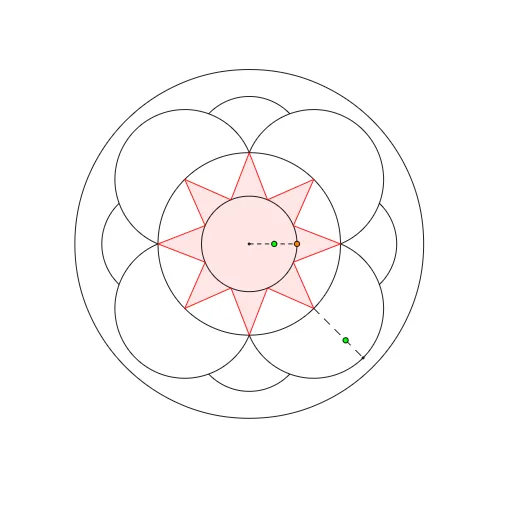
Circular flowerbed: symmetric construction using circle arcs and angle bisectors
Loading the math board and drawing, please wait…
This example demonstrates how to design a circular flowerbed layout by constructing arcs and segments inside a circle, producing an internally symmetric geometric configuration. Key mathematics includes circle and arc geometry, angle bisectors, perpendicular (orthogonal) relationships, and forming polygon regions from intersection points. The workflow highlights how intersections and auxiliary lines determine a polygonal area with clear structural properties. Construction approach: Circle creates the main circle; Point and Intersect locate critical intersection points on/with the circle (objects such as A, B, C, D, etc.); Segment and Ray define boundary edges and directions; OrthogonalLine builds perpendicular helpers; AngularBisector provides bisector lines; Polygon and CircleArc assemble the final polygon regions (poly1, poly2) and the flowerbed boundary made of circular arc pieces. Suitable for middle school to early undergraduate geometry lessons, especially for teaching geometric construction strategies and synthesizing symmetry, angles, and area-relevant configuration building.
GeoGebra Commands & Parameters
Intersect(xAxis, yAxis) → ACircle(A, 1) → cPoint(c) → BSegment(A, B) → aPoint(a) → CSegment(A, C) → bCircle(A, 1 / b) → dRay(A, B) → eIntersect(d, e, 1) → DCircle(A, 1 / b^(2)) → fIntersect(f, e, 1) → EOrthogonalLine(A, a) → hIntersect(d, h, 2) → GAngularBisector(D, A, G) → iIntersect(d, i, 2) → HPolygon(D, H, 8) → poly1, j, J, K, L, M, N, k, l, m, n, p, q, r, IAngularBisector(N, A, D) → sAngularBisector(D, A, H) → tIntersect(c, s, 2) → OIntersect(c, t, 2) → PPolygon(O, P, 8) → poly2, a_1, R, S, T, U, V, b_1, c_1, d_1, e_1, f_1, g_1, h_1, QPolygon(O, D, T, L, U, M, V, N, P, H, Q, I, R, J, S, K) → poly3, o, k_1, t_1, l_1, u, m_1, v, n_1, d_2, p_1, h_2, q_1, i_1, r_1, j_1, s_1CircleArc(H, D, I) → f_2CircleArc(J, I, K) → g_2CircleArc(L, K, M) → k_2CircleArc(N, M, D) → p_2Ray(A, N) → gIntersect(p_2, g, 1) → FSegment(N, F) → a_2Point(a_2) → WCircle(A, W) → c_2Intersect(c_2, p_2) → Z, A_1, ,Intersect(c_2, f_2) → B_1, C_1, ,Intersect(c_2, g_2) → D_1, E_1, ,Intersect(c_2, k_2) → F_1, G_1, ,CircleArc(I, B_1, E_1) → e_2CircleArc(K, D_1, G_1) → q_2CircleArc(M, F_1, A_1) → r_2CircleArc(D, Z, C_1) → s_2
AI Drawing Prompt Reference
Draw a layout of a circular flowerbed. The figure consists of a main circle, with key points determined by intersections, line segments, rays, and perpendicular lines. Angle bisectors are used to construct symmetric polygonal regions. Finally, circular arcs connect these regions to form the flowerbed boundary. The overall design shows internal symmetry and clear structure, suitable for geometry lessons.
The prompt above was compiled from the original drawing commands and is for reference only.